<!DOCTYPE html>
    <html lang="vi" xmlns="http://www.w3.org/1999/xhtml" prefix="og: http://ogp.me/ns#">
    <head>
<title>Cài đặt và sử dụng iCloud trên Windows với iCloud Control Panel</title>
<meta name="description" content="Cài đặt và sử dụng iCloud trên Windows với iCloud Control Panel - Savefile - Tin Tức -...">
<meta name="author" content="MangVN">
<meta name="copyright" content="MangVN [admin@vinades.vn]">
<meta name="generator" content="NukeViet v4.5">
<meta name="viewport" content="width=device-width, initial-scale=1">
<meta http-equiv="Content-Type" content="text/html; charset=utf-8">
<meta property="og:title" content="Cài đặt và sử dụng iCloud trên Windows với iCloud Control Panel">
<meta property="og:type" content="website">
<meta property="og:description" content="Savefile - Tin Tức - https&#x3A;&#x002F;&#x002F;mangvn.org&#x002F;savefile&#x002F;Phan-mem-Tin-hoc&#x002F;Cai-dat-va-su-dung-iCloud-tren-Windows-voi-iCloud-Control-Panel-3326.html">
<meta property="og:site_name" content="MangVN">
<meta property="og:url" content="https://mangvn.org/savefile/Phan-mem-Tin-hoc/Cai-dat-va-su-dung-iCloud-tren-Windows-voi-iCloud-Control-Panel-3326.html">
<link rel="shortcut icon" href="https://mangvn.org/favicon.ico">
<link rel="canonical" href="https://mangvn.org/savefile/Phan-mem-Tin-hoc/Cai-dat-va-su-dung-iCloud-tren-Windows-voi-iCloud-Control-Panel-3326.html">
<link rel="alternate" href="https://mangvn.org/rss/" title="Tin Tức" type="application/rss+xml">
<link rel="alternate" href="https://mangvn.org/rss/Tin-nhanh-Cong-nghe/" title="Tin Tức - Tin nhanh Công nghệ" type="application/rss+xml">
<link rel="alternate" href="https://mangvn.org/rss/Virut-Hacker-Bao-mat/" title="Tin Tức - Virut, Hacker & Bảo mật" type="application/rss+xml">
<link rel="alternate" href="https://mangvn.org/rss/CNTT/" title="Tin Tức - CNTT" type="application/rss+xml">
<link rel="alternate" href="https://mangvn.org/rss/Vien-thong/" title="Tin Tức - Viễn thông" type="application/rss+xml">
<link rel="alternate" href="https://mangvn.org/rss/May-tinh/" title="Tin Tức - Máy tính" type="application/rss+xml">
<link rel="alternate" href="https://mangvn.org/rss/Dien-thoai/" title="Tin Tức - Điện thoại" type="application/rss+xml">
<link rel="alternate" href="https://mangvn.org/rss/May-anh/" title="Tin Tức - Máy ảnh" type="application/rss+xml">
<link rel="alternate" href="https://mangvn.org/rss/Thu-thuat-Phan-mem/" title="Tin Tức - Thủ thuật - Phần mềm" type="application/rss+xml">
<link rel="alternate" href="https://mangvn.org/rss/Phan-mem-Tin-hoc/" title="Tin Tức - Phần mềm Tin học" type="application/rss+xml">
<link rel="alternate" href="https://mangvn.org/rss/Thu-thuat-tin-hoc/" title="Tin Tức - Thủ thuật tin học" type="application/rss+xml">
<link rel="alternate" href="https://mangvn.org/rss/Thiet-ke-Web/" title="Tin Tức - Thiết kế Web" type="application/rss+xml">
<link rel="alternate" href="https://mangvn.org/rss/Kien-thuc-co-ban/" title="Tin Tức - Kiến thức cơ bản" type="application/rss+xml">
<link rel="alternate" href="https://mangvn.org/rss/PHP-HTML-JavaScript/" title="Tin Tức - PHP, HTML & JavaScript" type="application/rss+xml">
<link rel="alternate" href="https://mangvn.org/rss/Quang-cao-tang-thu-nhap/" title="Tin Tức - Quảng cáo tăng thu nhập" type="application/rss+xml">
<link rel="alternate" href="https://mangvn.org/rss/Tao-Web-bang-NukeViet/" title="Tin Tức - Tạo Web NukeViet" type="application/rss+xml">
<link rel="alternate" href="https://mangvn.org/rss/Ban-tin-an-ninh/" title="Tin Tức - Bản tin an ninh" type="application/rss+xml">
<link rel="alternate" href="https://mangvn.org/rss/Tin-tuc-NukeViet/" title="Tin Tức - Tin tức NukeViet" type="application/rss+xml">
<link rel="alternate" href="https://mangvn.org/rss/Nhan-vat-su-kien/" title="Tin Tức - Nhân vật & sự kiện" type="application/rss+xml">
<link rel="alternate" href="https://mangvn.org/rss/Huong-dan-su-dung/" title="Tin Tức - Hướng dẫn sử dụng" type="application/rss+xml">
<link rel="alternate" href="https://mangvn.org/rss/He-thong-NukeViet-20/" title="Tin Tức - Hệ thống NukeViet 2.0" type="application/rss+xml">
<link rel="alternate" href="https://mangvn.org/rss/He-thong-NukeViet-10/" title="Tin Tức - Hệ thống NukeViet 1.0" type="application/rss+xml">
<link rel="alternate" href="https://mangvn.org/rss/NukeViet-co-ban/" title="Tin Tức - NukeViet cơ bản" type="application/rss+xml">
<link rel="alternate" href="https://mangvn.org/rss/Web-Internet/" title="Tin Tức - Web & Internet" type="application/rss+xml">
<link rel="alternate" href="https://mangvn.org/rss/Thu-thuat-Internet/" title="Tin Tức - Thủ thuật Internet" type="application/rss+xml">
<link rel="alternate" href="https://mangvn.org/rss/Dich-vu-tien-ich/" title="Tin Tức - Dịch vụ & tiện ích" type="application/rss+xml">
<link rel="alternate" href="https://mangvn.org/rss/Website-nen-vao/" title="Tin Tức - Website nên vào" type="application/rss+xml">
<link rel="alternate" href="https://mangvn.org/rss/Thong-tin-khuyen-mai/" title="Tin Tức - Thông tin khuyến mại" type="application/rss+xml">
<link rel="alternate" href="https://mangvn.org/rss/thuong-mai-dien-tu/" title="Tin Tức - Thương mại điện tử" type="application/rss+xml">
<link rel="alternate" href="https://mangvn.org/rss/Hau-truong/" title="Tin Tức - Hậu trường" type="application/rss+xml">
<link rel="alternate" href="https://mangvn.org/rss/Blog-Admin/" title="Tin Tức - Blog Admin" type="application/rss+xml">
<link rel="alternate" href="https://mangvn.org/rss/Cong-tac-vien/" title="Tin Tức - Cộng tác viên" type="application/rss+xml">
<link rel="alternate" href="https://mangvn.org/rss/Chuyen-cong-nghe/" title="Tin Tức - Chuyện công nghệ" type="application/rss+xml">
<link rel="alternate" href="https://mangvn.org/rss/Chuyen-kinh-doanh/" title="Tin Tức - Chuyện kinh doanh" type="application/rss+xml">
<link rel="alternate" href="https://mangvn.org/rss/Cuoc-song-quanh-ta/" title="Tin Tức - Cuộc sống quanh ta" type="application/rss+xml">
<link rel="alternate" href="https://mangvn.org/rss/Cuoi-thu-gian/" title="Tin Tức - Cười thư giãn" type="application/rss+xml">
<link rel="alternate" href="https://mangvn.org/rss/Lang-nghe-va-suy-ngam/" title="Tin Tức - Lắng nghe và suy ngẫm" type="application/rss+xml">
<link rel="alternate" href="https://mangvn.org/rss/Kien-thuc-Song/" title="Tin Tức - Kiến thức Sống" type="application/rss+xml">
<link rel="preload" as="style" href="https://mangvn.org/assets/css/font-awesome.min.css" type="text/css">
<link rel="preload" as="style" href="https://mangvn.org/themes/default/css/bootstrap.min.css" type="text/css">
<link rel="preload" as="style" href="https://mangvn.org/themes/default/css/style.css" type="text/css">
<link rel="preload" as="style" href="https://mangvn.org/themes/default/css/style.responsive.css" type="text/css">
<link rel="preload" as="style" href="https://mangvn.org/themes/default/css/news.css" type="text/css">
<link rel="preload" as="style" href="https://mangvn.org/themes/default/css/custom.css" type="text/css">
<link rel="preload" as="script" href="https://mangvn.org/assets/js/jquery/jquery.min.js" type="text/javascript">
<link rel="preload" as="script" href="https://mangvn.org/assets/js/language/vi.js" type="text/javascript">
<link rel="preload" as="script" href="https://mangvn.org/assets/js/DOMPurify/purify3.js" type="text/javascript">
<link rel="preload" as="script" href="https://mangvn.org/assets/js/global.js" type="text/javascript">
<link rel="preload" as="script" href="https://mangvn.org/assets/js/site.js" type="text/javascript">
<link rel="preload" as="script" href="https://mangvn.org/themes/default/js/news.js" type="text/javascript">
<link rel="preload" as="script" href="https://mangvn.org/themes/default/js/main.js" type="text/javascript">
<link rel="preload" as="script" href="https://mangvn.org/themes/default/js/custom.js" type="text/javascript">
<link rel="preload" as="script" href="https://mangvn.org/themes/default/js/bootstrap.min.js" type="text/javascript">
<link rel="stylesheet" href="https://mangvn.org/assets/css/font-awesome.min.css">
<link rel="stylesheet" href="https://mangvn.org/themes/default/css/bootstrap.min.css">
<link rel="stylesheet" href="https://mangvn.org/themes/default/css/style.css">
<link rel="stylesheet" href="https://mangvn.org/themes/default/css/style.responsive.css">
<link rel="StyleSheet" href="https://mangvn.org/themes/default/css/news.css">
<link rel="stylesheet" href="https://mangvn.org/themes/default/css/custom.css">
<style type="text/css">
	body{background: #fff;}
</style>
    </head>
    <body>
<div id="print">
	<div id="hd_print">
		<h2 class="pull-left">MangVN</h2>
		<p class="pull-right"><a title="MangVN" href="https://mangvn.org/">https://mangvn.org</a></p>
	</div>
	<div class="clear"></div>
	<hr />
	<div id="content">
		<h1>Cài đặt và sử dụng iCloud trên Windows với iCloud Control Panel</h1>
		<ul class="list-inline">
			<li>Thứ tư - 26/10/2011 13:37</li>
			<li class="hidden-print txtrequired"><em class="fa fa-print">&nbsp;</em><a title="In ra" href="javascript:;" onclick="window.print()">In ra</a></li>
			<li class="hidden-print txtrequired"><em class="fa fa-power-off">&nbsp;</em><a title="Đóng cửa sổ này" href="javascript:;" onclick="window.close()">Đóng cửa sổ này</a></li>
		</ul>
		<div class="clear"></div>
		<div id="hometext">
			Dịch vụ lưu trữ đám mây iCloud của Apple là một công cụ tuyệt vời cho việc giữ gìn danh bạ liên lạc, lịch làm việc và các dữ liệu quan trọng khác vì bạn có thể đồng bộ nhanh chóng những dữ liệu này giữa các thiết bị của...
		</div>
				<div class="imghome">
			<img alt="Cài đặt và sử dụng iCloud trên Windows với iCloud Control Panel" src="https://mangvn.org/uploads/news/2011_10/step8icloud628x480.png" width="460" class="img-thumbnail" />
		</div>
		<div class="clear"></div>
		<div id="bodytext" class="clearfix">
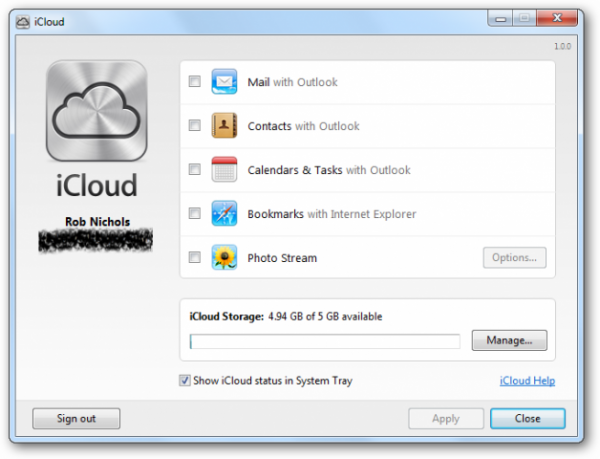
			<div style="TEXT-ALIGN: justify"></div><div style="TEXT-ALIGN: justify"></div><div style="TEXT-ALIGN: justify; FONT-STYLE: italic">Dịch vụ lưu trữ đám mây iCloud của Apple là một công cụ tuyệt vời cho việc giữ gìn danh bạ liên lạc, lịch làm việc và các dữ liệu quan trọng khác vì bạn có thể đồng bộ nhanh chóng những dữ liệu này giữa các thiết bị của Apple như iPhone, iPad. Tuy nhiên với người dùng sử dụng hệ điều hành Windows thì việc đồng bộ dữ liệu với iCloud phải làm thế nào? Bài viết này sẽ hướng dẫn bạn với sự hỗ trợ của ứng dụng <span style="FONT-WEIGHT: bold">iCloud Control Panel for Windows</span>. </div><div style="TEXT-ALIGN: justify; FONT-STYLE: italic"> </div><div style="TEXT-ALIGN: justify; FONT-STYLE: italic"></div><h3 style="TEXT-ALIGN: justify; FONT-WEIGHT: bold">Cài đặt</h3><p style="TEXT-ALIGN: justify; FONT-WEIGHT: bold"> </p><div style="TEXT-ALIGN: justify"></div><p style="TEXT-ALIGN: justify">Tải ứng dụng về từ địa chỉ: <a href="http://support.apple.com/kb/DL1455">http://support.apple.com/kb/DL1455</a> </p><div style="TEXT-ALIGN: justify"></div><p style="TEXT-ALIGN: justify"><span style="FONT-STYLE: italic">Dung lượng</span>: 39.8Mb</p><div style="TEXT-ALIGN: justify"></div><div style="TEXT-ALIGN: justify"><span style="FONT-STYLE: italic">Yêu cầu hệ thống</span>: HĐH Windows Vista SP2 hoặc Windows 7. Trình duyệt Safari 5.1.1 hoặc IE 8 trở lên. Microsoft Outlook 2007 hoặc 2010. </div><div style="TEXT-ALIGN: justify"> </div><div style="TEXT-ALIGN: justify"> </div><div style="TEXT-ALIGN: center"><div style="TEXT-ALIGN: center"><img style="MARGIN: 5px" src="http://Images.xhtt.vn/Images/Uploaded/Share/2011/10/20111026033815546/Step1Website612x480.png" width="500" _fl="" /></div><br /></div><p></p><div style="TEXT-ALIGN: justify"></div><div style="TEXT-ALIGN: justify"></div><p style="TEXT-ALIGN: justify">Click vào nút Download bạn sẽ thấy hiện ra hộp thoại sau:</p><div style="TEXT-ALIGN: justify"></div><p style="TEXT-ALIGN: justify"></p><div style="TEXT-ALIGN: center"><img style="MARGIN: 5px" src="http://Images.xhtt.vn/Images/Uploaded/Share/2011/10/20111026033815546/image002.jpg" width="442" _fl="" /></div>Chọn Run và quá trình cài đặt iCloud Control Panel sẽ bắt đầu<p></p><div style="TEXT-ALIGN: justify"></div><p style="TEXT-ALIGN: justify"></p><div style="TEXT-ALIGN: center"><img style="MARGIN: 5px" src="http://Images.xhtt.vn/Images/Uploaded/Share/2011/10/20111026033815546/image003.jpg" width="500" _fl="" /></div>Chọn Next -&gt; Ở hộp thoại tiếp theo, chọn “I accept the terms in the license agreement” và ấn Install.<div style="TEXT-ALIGN: center"><img style="MARGIN: 5px" src="http://Images.xhtt.vn/Images/Uploaded/Share/2011/10/20111026033815546/image004.jpg" width="500" _fl="" /></div><p></p><div style="TEXT-ALIGN: justify"></div><div style="TEXT-ALIGN: justify"></div><p style="TEXT-ALIGN: justify">Quá trình cài đặt diễn ra bình thường</p><div style="TEXT-ALIGN: justify"></div><div style="TEXT-ALIGN: justify"></div><p style="TEXT-ALIGN: justify"></p><div style="TEXT-ALIGN: center"><img style="MARGIN: 5px" src="http://Images.xhtt.vn/Images/Uploaded/Share/2011/10/20111026033815546/image005.jpg" width="500" _fl="" /></div>Và hoàn tất khi bạn nhìn thấy hộp thoại chúc mừng phía dưới. Hãy ấn vào nút Finish để kết thúc.<div style="TEXT-ALIGN: center"><img style="MARGIN: 5px" src="http://Images.xhtt.vn/Images/Uploaded/Share/2011/10/20111026033815546/image006.jpg" width="500" _fl="" /></div><p></p><div style="TEXT-ALIGN: justify"></div><div style="TEXT-ALIGN: justify"></div><h3 style="TEXT-ALIGN: justify">Sử dụng iCloud Control Panel</h3><div style="TEXT-ALIGN: justify"></div><p style="TEXT-ALIGN: justify">Vào cuối quá trình cài đặt, trừ khi bạn bỏ chọn ở tùy chọn “Open the iCloud Control Panel”, không thì hộp thoại iCloud phía dưới sẽ hiện ra. </p><div style="TEXT-ALIGN: center"><img style="MARGIN: 5px" src="http://Images.xhtt.vn/Images/Uploaded/Share/2011/10/20111026033815546/image007.gif" width="500" _fl="" /></div><p></p><div style="TEXT-ALIGN: justify"></div><div style="TEXT-ALIGN: justify"></div><p style="TEXT-ALIGN: justify">Đăng nhập bằng tài khoản Apple của bạn, iCloud sẽ hoạt động tương tự như trên hệ điều hành Mac, nếu đã từng sử dụng qua, người dùng sẽ thấy quen thuộc và không có gì khác biệt. </p><p style="TEXT-ALIGN: justify"></p><div style="TEXT-ALIGN: center"><div style="TEXT-ALIGN: center"><img style="MARGIN: 5px" src="http://Images.xhtt.vn/Images/Uploaded/Share/2011/10/20111026033815546/Step8iCloud628x480.png" width="500" _fl="" /></div><br /></div>Giờ đây, bạn có thể lựa chọn để đồng bộ những dữ liệu mà bạn muốn cập nhật sang PC cài HĐH Windows như: Mail, danh bạ liên lạc, lịch làm việc, ảnh cá nhân, bookmarts của trình duyệt…<p></p><div style="TEXT-ALIGN: justify"></div><div style="TEXT-ALIGN: justify" align="justify"> </div><div style="TEXT-ALIGN: justify" align="justify">Tuy nhiên, điểm hạn chế là công cụ iCloud Control Panel chỉ hỗ trợ bạn đồng bộ duy nhất với Mail, Contacts trong Microsoft Outlook cũng như Bookmarks (Favourites) của trình duyệt Internet Explorer chứ không hỗ trợ trình quản lý mail Thunderbird hay Google Chrome. </div><div style="TEXT-ALIGN: justify"> </div><div style="TEXT-ALIGN: justify"> </div><div style="TEXT-ALIGN: justify"></div><div style="TEXT-ALIGN: justify">Ngoài ra, với dung lượng miễn phí chỉ 5Gb, bạn sẽ phải cân nhắc ưu tiên lưu trữ những dữ liệu nào cần thiết hơn (như mail, danh bạ, lịch, bookmarks…) chứ không thể thoải mái lưu trữ ảnh hay các dữ liệu chiếm dụng dung lượng lớn như các file đa phương tiện. Muốn vậy, bạn cần phải đặt mua thêm dung lượng lưu trữ từ Apple. Mức giá Apple đưa ra hiện nay là: 2$/năm cho mỗi Gb dung lượng thêm vào (không có sự ưu đãi khi mua nhiều hay mua ít). </div><div style="TEXT-ALIGN: justify"> </div><div style="TEXT-ALIGN: justify"></div><h2 style="TEXT-ALIGN: justify">Kết luận</h2><p style="TEXT-ALIGN: justify"> </p><div style="TEXT-ALIGN: justify"></div><div style="TEXT-ALIGN: justify">Ứng dụng này giúp cho người dùng Windows cũng có thể giao tiếp với các dữ liệu được lưu trữ trên dịch vụ iCloud của Apple là một tín hiệu mừng khi các sản phẩm của Apple vốn nổi tiếng về “tính đóng” trong nền tảng. Tuy còn một số điểm chưa hài lòng như người dùng không thể đồng bộ bookmarks của một trình duyệt khác ngoài IE hay đồng bộ dữ liệu mail không phải được lưu trữ bằng Outlook Express nhưng dù sao chúng ta cũng cứ tạm dùng vậy. Một số người cho rằng, ứng dụng này được phát triển là vì nó giúp cho Apple “trồng hạt giống” trên nền tảng của đối thủ “Microsoft” và Apple có thể thu lời từ việc bán dung lượng lưu trữ cộng thêm của dịch vụ iCloud, tuy nhiên, đứng về phương diện người dùng thì thường đó không phải là điều cần quan tâm.</div><div style="TEXT-ALIGN: justify"> </div><div style="TEXT-ALIGN: justify"> </div><div style="TEXT-ALIGN: justify"></div><div style="TEXT-ALIGN: justify"></div><p style="TEXT-ALIGN: justify"><span style="FONT-WEIGHT: bold">Hoàng Mai</span> (Theo Vikitech)</p>
		</div>
				<div id="author">
						<p>
				<strong>Nguồn tin:</strong>
				http://xahoithongtin.com.vn
			</p>
		</div>
	</div>
	<div id="footer" class="clearfix">
		<div id="url">
			<strong>URL của bản tin này: </strong><a href="https://mangvn.org/savefile/Phan-mem-Tin-hoc/Cai-dat-va-su-dung-iCloud-tren-Windows-voi-iCloud-Control-Panel-3326.html" title="Cài đặt và sử dụng iCloud trên Windows với iCloud Control Panel">https://mangvn.org/savefile/Phan-mem-Tin-hoc/Cai-dat-va-su-dung-iCloud-tren-Windows-voi-iCloud-Control-Panel-3326.html</a>

		</div>
		<div class="clear"></div>
		<div class="copyright">
			&copy; MangVN
		</div>
		<div id="contact">
			<a href="mailto:admin@vinades.vn">admin@vinades.vn</a>
		</div>
	</div>
</div>
        <div id="timeoutsess" class="chromeframe">
            Bạn đã không sử dụng Site, <a onclick="timeoutsesscancel();" href="https://mangvn.org/#">Bấm vào đây để duy trì trạng thái đăng nhập</a>. Thời gian chờ: <span id="secField"> 60 </span> giây
        </div>
        <div id="openidResult" class="nv-alert" style="display:none"></div>
        <div id="openidBt" data-result="" data-redirect=""></div>
<script src="https://mangvn.org/assets/js/jquery/jquery.min.js"></script>
<script>var nv_base_siteurl="/",nv_lang_data="vi",nv_lang_interface="vi",nv_name_variable="nv",nv_fc_variable="op",nv_lang_variable="language",nv_module_name="news",nv_func_name="savefile",nv_is_user=0, nv_my_ofs=-4,nv_my_abbr="EDT",nv_cookie_prefix="nv4c_b41EI",nv_check_pass_mstime=1738000,nv_area_admin=0,nv_safemode=0,theme_responsive=1,nv_recaptcha_ver=2,nv_recaptcha_sitekey="6LfaEikpAAAAAB7BnT8L5ijh2CCG0esJquuWj9ZJ",nv_recaptcha_type="image",XSSsanitize=1;</script>
<script src="https://mangvn.org/assets/js/language/vi.js"></script>
<script src="https://mangvn.org/assets/js/DOMPurify/purify3.js"></script>
<script src="https://mangvn.org/assets/js/global.js"></script>
<script src="https://mangvn.org/assets/js/site.js"></script>
<script src="https://mangvn.org/themes/default/js/news.js"></script>
<script src="https://mangvn.org/themes/default/js/main.js"></script>
<script src="https://mangvn.org/themes/default/js/custom.js"></script>
<script type="application/ld+json">
        {
            "@context": "https://schema.org",
            "@type": "Organization",
            "url": "https://mangvn.org",
            "logo": "https://mangvn.org/uploads/logo-mangvn.png"
        }
        </script>
<script src="https://mangvn.org/themes/default/js/bootstrap.min.js"></script>
</body>
</html>