<!DOCTYPE html>
    <html lang="vi" xmlns="http://www.w3.org/1999/xhtml" prefix="og: http://ogp.me/ns#">
    <head>
<title>Hướng dẫn sử dụng Google Cloud Print</title>
<meta name="description" content="Hướng dẫn sử dụng Google Cloud Print - Savefile - Tin Tức - https&#x3A;&#x002F;&#x002F;mangvn.org&#x002F;savefile&#x002F;Thu-thuat-Phan-mem&#x002F;Huong-dan-su-dung-Google-Cloud-Print-2285.html">
<meta name="author" content="MangVN">
<meta name="copyright" content="MangVN [admin@vinades.vn]">
<meta name="generator" content="NukeViet v4.5">
<meta name="viewport" content="width=device-width, initial-scale=1">
<meta http-equiv="Content-Type" content="text/html; charset=utf-8">
<meta property="og:title" content="Hướng dẫn sử dụng Google Cloud Print">
<meta property="og:type" content="website">
<meta property="og:description" content="Savefile - Tin Tức - https&#x3A;&#x002F;&#x002F;mangvn.org&#x002F;savefile&#x002F;Thu-thuat-Phan-mem&#x002F;Huong-dan-su-dung-Google-Cloud-Print-2285.html">
<meta property="og:site_name" content="MangVN">
<meta property="og:url" content="https://mangvn.org/savefile/Thu-thuat-Phan-mem/Huong-dan-su-dung-Google-Cloud-Print-2285.html">
<link rel="shortcut icon" href="https://mangvn.org/favicon.ico">
<link rel="canonical" href="https://mangvn.org/savefile/Thu-thuat-Phan-mem/Huong-dan-su-dung-Google-Cloud-Print-2285.html">
<link rel="alternate" href="https://mangvn.org/rss/" title="Tin Tức" type="application/rss+xml">
<link rel="alternate" href="https://mangvn.org/rss/Tin-nhanh-Cong-nghe/" title="Tin Tức - Tin nhanh Công nghệ" type="application/rss+xml">
<link rel="alternate" href="https://mangvn.org/rss/Virut-Hacker-Bao-mat/" title="Tin Tức - Virut, Hacker & Bảo mật" type="application/rss+xml">
<link rel="alternate" href="https://mangvn.org/rss/CNTT/" title="Tin Tức - CNTT" type="application/rss+xml">
<link rel="alternate" href="https://mangvn.org/rss/Vien-thong/" title="Tin Tức - Viễn thông" type="application/rss+xml">
<link rel="alternate" href="https://mangvn.org/rss/May-tinh/" title="Tin Tức - Máy tính" type="application/rss+xml">
<link rel="alternate" href="https://mangvn.org/rss/Dien-thoai/" title="Tin Tức - Điện thoại" type="application/rss+xml">
<link rel="alternate" href="https://mangvn.org/rss/May-anh/" title="Tin Tức - Máy ảnh" type="application/rss+xml">
<link rel="alternate" href="https://mangvn.org/rss/Thu-thuat-Phan-mem/" title="Tin Tức - Thủ thuật - Phần mềm" type="application/rss+xml">
<link rel="alternate" href="https://mangvn.org/rss/Phan-mem-Tin-hoc/" title="Tin Tức - Phần mềm Tin học" type="application/rss+xml">
<link rel="alternate" href="https://mangvn.org/rss/Thu-thuat-tin-hoc/" title="Tin Tức - Thủ thuật tin học" type="application/rss+xml">
<link rel="alternate" href="https://mangvn.org/rss/Thiet-ke-Web/" title="Tin Tức - Thiết kế Web" type="application/rss+xml">
<link rel="alternate" href="https://mangvn.org/rss/Kien-thuc-co-ban/" title="Tin Tức - Kiến thức cơ bản" type="application/rss+xml">
<link rel="alternate" href="https://mangvn.org/rss/PHP-HTML-JavaScript/" title="Tin Tức - PHP, HTML & JavaScript" type="application/rss+xml">
<link rel="alternate" href="https://mangvn.org/rss/Quang-cao-tang-thu-nhap/" title="Tin Tức - Quảng cáo tăng thu nhập" type="application/rss+xml">
<link rel="alternate" href="https://mangvn.org/rss/Tao-Web-bang-NukeViet/" title="Tin Tức - Tạo Web NukeViet" type="application/rss+xml">
<link rel="alternate" href="https://mangvn.org/rss/Ban-tin-an-ninh/" title="Tin Tức - Bản tin an ninh" type="application/rss+xml">
<link rel="alternate" href="https://mangvn.org/rss/Tin-tuc-NukeViet/" title="Tin Tức - Tin tức NukeViet" type="application/rss+xml">
<link rel="alternate" href="https://mangvn.org/rss/Nhan-vat-su-kien/" title="Tin Tức - Nhân vật & sự kiện" type="application/rss+xml">
<link rel="alternate" href="https://mangvn.org/rss/Huong-dan-su-dung/" title="Tin Tức - Hướng dẫn sử dụng" type="application/rss+xml">
<link rel="alternate" href="https://mangvn.org/rss/He-thong-NukeViet-20/" title="Tin Tức - Hệ thống NukeViet 2.0" type="application/rss+xml">
<link rel="alternate" href="https://mangvn.org/rss/He-thong-NukeViet-10/" title="Tin Tức - Hệ thống NukeViet 1.0" type="application/rss+xml">
<link rel="alternate" href="https://mangvn.org/rss/NukeViet-co-ban/" title="Tin Tức - NukeViet cơ bản" type="application/rss+xml">
<link rel="alternate" href="https://mangvn.org/rss/Web-Internet/" title="Tin Tức - Web & Internet" type="application/rss+xml">
<link rel="alternate" href="https://mangvn.org/rss/Thu-thuat-Internet/" title="Tin Tức - Thủ thuật Internet" type="application/rss+xml">
<link rel="alternate" href="https://mangvn.org/rss/Dich-vu-tien-ich/" title="Tin Tức - Dịch vụ & tiện ích" type="application/rss+xml">
<link rel="alternate" href="https://mangvn.org/rss/Website-nen-vao/" title="Tin Tức - Website nên vào" type="application/rss+xml">
<link rel="alternate" href="https://mangvn.org/rss/Thong-tin-khuyen-mai/" title="Tin Tức - Thông tin khuyến mại" type="application/rss+xml">
<link rel="alternate" href="https://mangvn.org/rss/thuong-mai-dien-tu/" title="Tin Tức - Thương mại điện tử" type="application/rss+xml">
<link rel="alternate" href="https://mangvn.org/rss/Hau-truong/" title="Tin Tức - Hậu trường" type="application/rss+xml">
<link rel="alternate" href="https://mangvn.org/rss/Blog-Admin/" title="Tin Tức - Blog Admin" type="application/rss+xml">
<link rel="alternate" href="https://mangvn.org/rss/Cong-tac-vien/" title="Tin Tức - Cộng tác viên" type="application/rss+xml">
<link rel="alternate" href="https://mangvn.org/rss/Chuyen-cong-nghe/" title="Tin Tức - Chuyện công nghệ" type="application/rss+xml">
<link rel="alternate" href="https://mangvn.org/rss/Chuyen-kinh-doanh/" title="Tin Tức - Chuyện kinh doanh" type="application/rss+xml">
<link rel="alternate" href="https://mangvn.org/rss/Cuoc-song-quanh-ta/" title="Tin Tức - Cuộc sống quanh ta" type="application/rss+xml">
<link rel="alternate" href="https://mangvn.org/rss/Cuoi-thu-gian/" title="Tin Tức - Cười thư giãn" type="application/rss+xml">
<link rel="alternate" href="https://mangvn.org/rss/Lang-nghe-va-suy-ngam/" title="Tin Tức - Lắng nghe và suy ngẫm" type="application/rss+xml">
<link rel="alternate" href="https://mangvn.org/rss/Kien-thuc-Song/" title="Tin Tức - Kiến thức Sống" type="application/rss+xml">
<link rel="preload" as="style" href="https://mangvn.org/assets/css/font-awesome.min.css" type="text/css">
<link rel="preload" as="style" href="https://mangvn.org/themes/default/css/bootstrap.min.css" type="text/css">
<link rel="preload" as="style" href="https://mangvn.org/themes/default/css/style.css" type="text/css">
<link rel="preload" as="style" href="https://mangvn.org/themes/default/css/style.responsive.css" type="text/css">
<link rel="preload" as="style" href="https://mangvn.org/themes/default/css/news.css" type="text/css">
<link rel="preload" as="style" href="https://mangvn.org/themes/default/css/custom.css" type="text/css">
<link rel="preload" as="script" href="https://mangvn.org/assets/js/jquery/jquery.min.js" type="text/javascript">
<link rel="preload" as="script" href="https://mangvn.org/assets/js/language/vi.js" type="text/javascript">
<link rel="preload" as="script" href="https://mangvn.org/assets/js/DOMPurify/purify3.js" type="text/javascript">
<link rel="preload" as="script" href="https://mangvn.org/assets/js/global.js" type="text/javascript">
<link rel="preload" as="script" href="https://mangvn.org/assets/js/site.js" type="text/javascript">
<link rel="preload" as="script" href="https://mangvn.org/themes/default/js/news.js" type="text/javascript">
<link rel="preload" as="script" href="https://mangvn.org/themes/default/js/main.js" type="text/javascript">
<link rel="preload" as="script" href="https://mangvn.org/themes/default/js/custom.js" type="text/javascript">
<link rel="preload" as="script" href="https://mangvn.org/themes/default/js/bootstrap.min.js" type="text/javascript">
<link rel="stylesheet" href="https://mangvn.org/assets/css/font-awesome.min.css">
<link rel="stylesheet" href="https://mangvn.org/themes/default/css/bootstrap.min.css">
<link rel="stylesheet" href="https://mangvn.org/themes/default/css/style.css">
<link rel="stylesheet" href="https://mangvn.org/themes/default/css/style.responsive.css">
<link rel="StyleSheet" href="https://mangvn.org/themes/default/css/news.css">
<link rel="stylesheet" href="https://mangvn.org/themes/default/css/custom.css">
<style type="text/css">
	body{background: #fff;}
</style>
    </head>
    <body>
<div id="print">
	<div id="hd_print">
		<h2 class="pull-left">MangVN</h2>
		<p class="pull-right"><a title="MangVN" href="https://mangvn.org/">https://mangvn.org</a></p>
	</div>
	<div class="clear"></div>
	<hr />
	<div id="content">
		<h1>Hướng dẫn sử dụng Google Cloud Print</h1>
		<ul class="list-inline">
			<li>Thứ năm - 13/10/2011 19:12</li>
			<li class="hidden-print txtrequired"><em class="fa fa-print">&nbsp;</em><a title="In ra" href="javascript:;" onclick="window.print()">In ra</a></li>
			<li class="hidden-print txtrequired"><em class="fa fa-power-off">&nbsp;</em><a title="Đóng cửa sổ này" href="javascript:;" onclick="window.close()">Đóng cửa sổ này</a></li>
		</ul>
		<div class="clear"></div>
		<div id="hometext">
			Nhắc tới Google là nhắc đến những đổi mới trong công nghệ từ tìm kiếm, dịch thuật, quản lý website, văn phòng trực tuyến...Mới đây, Google lại xâm nhập vào lĩnh vực in ấn trực tuyến với công nghệ in ấn mới Google Cloud Print - Công nghệ in ấn...
		</div>
				<div class="imghome">
			<img alt="Hướng dẫn sử dụng Google Cloud Print" src="https://mangvn.org/uploads/news/2011_10/googlecloudprintinan.jpg" width="460" class="img-thumbnail" />
		</div>
		<div class="clear"></div>
		<div id="bodytext" class="clearfix">
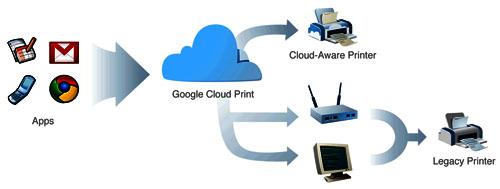
			<span class="Apple-style-span" style="font-family: Arial, Verdana, sans-serif; font-size: 12px; line-height: 15px; -webkit-border-horizontal-spacing: 2px; -webkit-border-vertical-spacing: 2px; "><p style="padding-top: 5px; padding-right: 0px; padding-bottom: 5px; padding-left: 0px; margin-top: 0px; margin-right: 0px; margin-bottom: 0px; margin-left: 0px; "><span style="color: rgb(0, 0, 0); ">Nhắc tới Google là nhắc đến những đổi mới trong công nghệ từ tìm kiếm, dịch thuật, quản lý website, văn phòng trực tuyến...Mới đây, Google lại xâm nhập vào lĩnh vực in ấn trực tuyến với công nghệ in ấn mới <span style="font-weight: bold; ">Google Cloud Print - Công nghệ in ấn &quot;đám mây&quot;</span>. Công nghệ in ấn mới này được tích hợp vào trình duyệt web Google Chrome. Theo đánh giá của các chuyên gia IT thì động thái tích hợp Google Cloud Print là một tác động mạnh để vực dậy trình duyệt web Google Chrome đang được Google đầu tư và mong đợi nhất hiện nay trước sự bành trướng của Firefox và Opera trên thị trường trình duyệt web.</span></p><p style="padding-top: 5px; padding-right: 0px; padding-bottom: 5px; padding-left: 0px; margin-top: 0px; margin-right: 0px; margin-bottom: 0px; margin-left: 0px; "><span style="color: rgb(0, 0, 0); "><span style="font-weight: bold; ">Google Cloud Print</span> được tích hợp vào Google Chrome OS 9.0.597.1, bạn có thể <a href="http://www.google.com/chrome/intl/en/p/cloudprint.html" target="_blank" style="padding-top: 0px; padding-right: 0px; padding-bottom: 0px; padding-left: 0px; margin-top: 0px; margin-right: 0px; margin-bottom: 0px; margin-left: 0px; text-decoration: underline; color: rgb(0, 0, 153); ">Download Google Chrome OS 9.0.597.1</a> và cài đặt trong môi trường Windows. Theo Google thì trong một thời gian ngắn tới Google Cloud Print sẽ tích hợp vào Chrome chạy trên nền Mac và Linux. Sau khi cài đặt trực tuyến Chrome từ Google thì mặc định chức năng Google Cloud Print sẽ xuất hiện trong trình duyệt này. Từđây, mỗi lần muốn in ấn bất cứ tài liệu gì, bạn đăng nhập bằng tài khoản google của mình, sau đó thực hiện lệnh in vào máy in Google Cloud Print,điều này cho phép bạn in tài liệu với bất kỳ máy in nào đang kết nối Internet.</span></p></span><span class="Apple-style-span" style="font-family: Arial, Verdana, sans-serif; font-size: 12px; line-height: 15px; -webkit-border-horizontal-spacing: 2px; -webkit-border-vertical-spacing: 2px; "><p style="padding-top: 5px; padding-right: 0px; padding-bottom: 5px; padding-left: 0px; margin-top: 0px; margin-right: 0px; margin-bottom: 0px; margin-left: 0px; "><span style="color: rgb(0, 0, 0); ">Để tìm hiểu công nghệ in ấn &quot;đám mây&quot; thú vị </span><span class="Apple-style-span" style="padding-top: 0px; padding-right: 0px; padding-bottom: 0px; padding-left: 0px; margin-top: 0px; margin-right: 0px; margin-bottom: 0px; margin-left: 0px; border-collapse: separate; font-family: &#039;Times New Roman&#039;; font-style: normal; font-variant: normal; font-weight: normal; letter-spacing: normal; line-height: normal; orphans: 2; text-indent: 0px; text-transform: none; white-space: normal; widows: 2; word-spacing: 0px; font-size: medium; color: rgb(0, 0, 0); "><span class="Apple-style-span" style="padding-top: 0px; padding-right: 0px; padding-bottom: 0px; padding-left: 0px; margin-top: 0px; margin-right: 0px; margin-bottom: 0px; margin-left: 0px; font-family: arial, sans-serif; font-size: 13px; text-align: left; ">Google Cloud Print của Google</span></span><span style="color: rgb(0, 0, 0); ">, chúng ta cùng thử cài đặt Google Chrome OS và thử tính năng này nhé:</span></p><p style="padding-top: 5px; padding-right: 0px; padding-bottom: 5px; padding-left: 0px; margin-top: 0px; margin-right: 0px; margin-bottom: 0px; margin-left: 0px; "><span style="color: rgb(0, 0, 0); ">Như đã nói ở trên, để có thể dùng chức năng Google Cloud Print bạn phải cài đặt Google Chrome (link download ở trên)</span></p><p style="padding-top: 5px; padding-right: 0px; padding-bottom: 5px; padding-left: 0px; margin-top: 0px; margin-right: 0px; margin-bottom: 0px; margin-left: 0px; "><span class="Apple-style-span" style="padding-top: 0px; padding-right: 0px; padding-bottom: 0px; padding-left: 0px; margin-top: 0px; margin-right: 0px; margin-bottom: 0px; margin-left: 0px; border-collapse: separate; font-family: &#039;Times New Roman&#039;; font-style: normal; font-variant: normal; font-weight: normal; letter-spacing: normal; line-height: normal; orphans: 2; text-indent: 0px; text-transform: none; white-space: normal; widows: 2; word-spacing: 0px; font-size: medium; color: rgb(0, 0, 0); "><span class="Apple-style-span" style="padding-top: 0px; padding-right: 0px; padding-bottom: 0px; padding-left: 0px; margin-top: 0px; margin-right: 0px; margin-bottom: 0px; margin-left: 0px; font-family: arial, sans-serif; font-size: 13px; text-align: left; ">Để kết nối một máy in có sẵn trên máy tính này để in ấn với Google Cloud Print, bạn cần kích hoạt Google Cloud Print kết nối trong Chrome. Chức năng Cloud Google Print Connector hiện có sẵn cho Chrome chạy trên Windows XP, 7 và Vista, với Chrome chạy trên Mac và Linux, Google hỗ trợ chức năng này trong thời gian sớm nhất.</span></span></p><p style="padding-top: 5px; padding-right: 0px; padding-bottom: 5px; padding-left: 0px; margin-top: 0px; margin-right: 0px; margin-bottom: 0px; margin-left: 0px; "></p><div style="text-align:center"><img _fl="" style="margin: 5px;" src="http://Images.xhtt.vn/Images/Uploaded/Share/2011/10/2011101302435203/GoogleCloudPrintinan.jpg" width="500" /></div><br /><p></p><p style="padding-top: 5px; padding-right: 0px; padding-bottom: 5px; padding-left: 0px; margin-top: 0px; margin-right: 0px; margin-bottom: 0px; margin-left: 0px; "><span style="color: rgb(0, 0, 0); "><span style="font-weight: bold; color: rgb(128, 0, 0); ">* Làm theo hướng dẫn để thiết lập Google Cloud Print (trên Website của Google) như sau:</span></span></p><p style="padding-top: 5px; padding-right: 0px; padding-bottom: 5px; padding-left: 0px; margin-top: 0px; margin-right: 0px; margin-bottom: 0px; margin-left: 0px; "><span class="Apple-style-span" style="padding-top: 0px; padding-right: 0px; padding-bottom: 0px; padding-left: 0px; margin-top: 0px; margin-right: 0px; margin-bottom: 0px; margin-left: 0px; border-collapse: separate; font-family: &#039;Times New Roman&#039;; font-style: normal; font-variant: normal; font-weight: normal; letter-spacing: normal; line-height: normal; orphans: 2; text-indent: 0px; text-transform: none; white-space: normal; widows: 2; word-spacing: 0px; font-size: medium; color: rgb(0, 0, 0); "><span class="Apple-style-span" style="padding-top: 0px; padding-right: 0px; padding-bottom: 0px; padding-left: 0px; margin-top: 0px; margin-right: 0px; margin-bottom: 0px; margin-left: 0px; font-family: arial, sans-serif; font-size: 13px; line-height: 16px; text-align: left; ">Trên máy tính Windows kết nối với máy in của bạn, hãy nhấp vào biểu tượng chìa khóa ốc ở góc trên bên phải của Google Chrome.</span></span></p><div style="text-align:center"><img _fl="" style="margin: 5px;" src="http://Images.xhtt.vn/Images/Uploaded/Share/2011/10/2011101302435203/Google-Cloud-print-01.png" width="396" /></div></span><p></p><span class="Apple-style-span" style="font-family: arial, sans-serif; font-size: 13px; line-height: 16px; -webkit-border-horizontal-spacing: 2px; -webkit-border-vertical-spacing: 2px; ">Chọn &quot;Tùy chọn.&quot;</span><span class="Apple-style-span" style="font-family: Arial, Verdana, sans-serif; font-size: 12px; line-height: 15px; -webkit-border-horizontal-spacing: 2px; -webkit-border-vertical-spacing: 2px; "><p style="padding-top: 5px; padding-right: 0px; padding-bottom: 5px; padding-left: 0px; margin-top: 0px; margin-right: 0px; margin-bottom: 0px; margin-left: 0px; "><span class="Apple-style-span" style="padding-top: 0px; padding-right: 0px; padding-bottom: 0px; padding-left: 0px; margin-top: 0px; margin-right: 0px; margin-bottom: 0px; margin-left: 0px; border-collapse: separate; font-family: &#039;Times New Roman&#039;; font-style: normal; font-variant: normal; font-weight: normal; letter-spacing: normal; line-height: normal; orphans: 2; text-indent: 0px; text-transform: none; white-space: normal; widows: 2; word-spacing: 0px; font-size: medium; color: rgb(0, 0, 0); "><span class="Apple-style-span" style="padding-top: 0px; padding-right: 0px; padding-bottom: 0px; padding-left: 0px; margin-top: 0px; margin-right: 0px; margin-bottom: 0px; margin-left: 0px; font-family: arial, sans-serif; font-size: 13px; line-height: 16px; text-align: left; "></span></span></p><div style="text-align:center"><img _fl="" style="margin: 5px;" src="http://Images.xhtt.vn/Images/Uploaded/Share/2011/10/2011101302435203/tuy-chon.jpg" width="500" /></div></span><p></p><span class="Apple-style-span" style="font-family: arial, sans-serif; font-size: 13px; line-height: 16px; -webkit-border-horizontal-spacing: 2px; -webkit-border-vertical-spacing: 2px; "><br /><div style="text-align:center"><img _fl="" style="margin: 5px;" src="http://Images.xhtt.vn/Images/Uploaded/Share/2011/10/2011101302435203/tuychon2.jpg" width="500" /></div></span><div><span class="Apple-style-span" style="font-family: Arial, Verdana, sans-serif; font-size: 12px; line-height: 15px; -webkit-border-horizontal-spacing: 2px; -webkit-border-vertical-spacing: 2px; color: rgb(0, 0, 0); "><span class="Apple-style-span" style="padding-top: 0px; padding-right: 0px; padding-bottom: 0px; padding-left: 0px; margin-top: 0px; margin-right: 0px; margin-bottom: 0px; margin-left: 0px; border-collapse: separate; color: rgb(0, 0, 0); font-family: &#039;Times New Roman&#039;; font-style: normal; font-variant: normal; font-weight: normal; letter-spacing: normal; line-height: normal; orphans: 2; text-indent: 0px; text-transform: none; white-space: normal; widows: 2; word-spacing: 0px; font-size: medium; "><span class="Apple-style-span" style="padding-top: 0px; padding-right: 0px; padding-bottom: 0px; padding-left: 0px; margin-top: 0px; margin-right: 0px; margin-bottom: 0px; margin-left: 0px; font-family: arial, sans-serif; font-size: 13px; line-height: 16px; text-align: left; ">Nhấp vào &quot;Under the Hood&quot; tab. Di chuyển đến cuối phần </span></span><span class="Apple-style-span" style="padding-top: 0px; padding-right: 0px; padding-bottom: 0px; padding-left: 0px; margin-top: 0px; margin-right: 0px; margin-bottom: 0px; margin-left: 0px; border-collapse: separate; color: rgb(0, 0, 0); font-family: &#039;Times New Roman&#039;; font-style: normal; font-variant: normal; font-weight: normal; letter-spacing: normal; line-height: normal; orphans: 2; text-indent: 0px; text-transform: none; white-space: normal; widows: 2; word-spacing: 0px; font-size: medium; "><span class="Apple-style-span" style="padding-top: 0px; padding-right: 0px; padding-bottom: 0px; padding-left: 0px; margin-top: 0px; margin-right: 0px; margin-bottom: 0px; margin-left: 0px; font-family: arial, sans-serif; font-size: 13px; text-align: left; background-color: transparent; ">Google Cloud Print</span></span><span class="Apple-style-span" style="padding-top: 0px; padding-right: 0px; padding-bottom: 0px; padding-left: 0px; margin-top: 0px; margin-right: 0px; margin-bottom: 0px; margin-left: 0px; border-collapse: separate; color: rgb(0, 0, 0); font-family: &#039;Times New Roman&#039;; font-style: normal; font-variant: normal; font-weight: normal; letter-spacing: normal; line-height: normal; orphans: 2; text-indent: 0px; text-transform: none; white-space: normal; widows: 2; word-spacing: 0px; font-size: medium; "><span class="Apple-style-span" style="padding-top: 0px; padding-right: 0px; padding-bottom: 0px; padding-left: 0px; margin-top: 0px; margin-right: 0px; margin-bottom: 0px; margin-left: 0px; font-family: arial, sans-serif; font-size: 13px; line-height: 16px; text-align: left; "> và nhấp vào &quot;Đăng nhập vào Google Cloud Print.&quot; (Sign in to </span></span></span><span class="Apple-style-span" style="font-family: Arial, Verdana, sans-serif; font-size: 12px; line-height: 15px; -webkit-border-horizontal-spacing: 2px; -webkit-border-vertical-spacing: 2px; "><span class="Apple-style-span" style="padding-top: 0px; padding-right: 0px; padding-bottom: 0px; padding-left: 0px; margin-top: 0px; margin-right: 0px; margin-bottom: 0px; margin-left: 0px; border-collapse: separate; font-family: &#039;Times New Roman&#039;; font-style: normal; font-variant: normal; font-weight: normal; letter-spacing: normal; line-height: normal; orphans: 2; text-indent: 0px; text-transform: none; white-space: normal; widows: 2; word-spacing: 0px; font-size: medium; color: rgb(0, 0, 0); "><span class="Apple-style-span" style="padding-top: 0px; padding-right: 0px; padding-bottom: 0px; padding-left: 0px; margin-top: 0px; margin-right: 0px; margin-bottom: 0px; margin-left: 0px; font-family: arial, sans-serif; font-size: 13px; text-align: left; ">Google Cloud Print)<div style="text-align:center"><img _fl="" style="margin: 5px;" src="http://Images.xhtt.vn/Images/Uploaded/Share/2011/10/2011101302435203/tai-khoan.jpg" width="500" /></div></span></span></span></div><div><div style="text-align: left;"><span class="Apple-style-span" style="font-family: arial, sans-serif; font-size: 13px; line-height: 16px; -webkit-border-horizontal-spacing: 2px; -webkit-border-vertical-spacing: 2px; ">Trong hộp thoại xuất hiện, hãy đăng nhập vào Tài khoản Google của bạn để cho phép Google Cloud Print.</span></div><div style="text-align: left;"><span class="Apple-style-span" style="font-family: arial, sans-serif; font-size: 13px; line-height: 16px; -webkit-border-horizontal-spacing: 2px; -webkit-border-vertical-spacing: 2px; "><span class="Apple-style-span" style="line-height: normal; ">Khi bạn đã đăng nhập, bạn sẽ thấy trang xác nhận:<div style="text-align:center"><img _fl="" style="margin: 5px;" src="http://Images.xhtt.vn/Images/Uploaded/Share/2011/10/2011101302435203/thanh-cong.jpg" width="500" /></div></span></span></div><div style="text-align: left;"><span class="Apple-style-span" style="font-family: Arial, Verdana, sans-serif; font-size: 12px; line-height: 15px; -webkit-border-horizontal-spacing: 2px; -webkit-border-vertical-spacing: 2px; "><p style="padding-top: 5px; padding-right: 0px; padding-bottom: 5px; padding-left: 0px; margin-top: 0px; margin-right: 0px; margin-bottom: 0px; margin-left: 0px; "><span style="color: rgb(0, 0, 0); "><span class="Apple-style-span" style="padding-top: 0px; padding-right: 0px; padding-bottom: 0px; padding-left: 0px; margin-top: 0px; margin-right: 0px; margin-bottom: 0px; margin-left: 0px; border-collapse: separate; color: rgb(0, 0, 0); font-family: &#039;Times New Roman&#039;; font-style: normal; font-variant: normal; font-weight: normal; letter-spacing: normal; line-height: normal; orphans: 2; text-indent: 0px; text-transform: none; white-space: normal; widows: 2; word-spacing: 0px; font-size: medium; "><span class="Apple-style-span" style="padding-top: 0px; padding-right: 0px; padding-bottom: 0px; padding-left: 0px; margin-top: 0px; margin-right: 0px; margin-bottom: 0px; margin-left: 0px; font-family: arial, sans-serif; font-size: 13px; text-align: left; ">Sau khi thiết lập </span></span><span class="Apple-style-span" style="padding-top: 0px; padding-right: 0px; padding-bottom: 0px; padding-left: 0px; margin-top: 0px; margin-right: 0px; margin-bottom: 0px; margin-left: 0px; border-collapse: separate; color: rgb(0, 0, 0); font-family: &#039;Times New Roman&#039;; font-style: normal; font-variant: normal; font-weight: normal; letter-spacing: normal; line-height: normal; orphans: 2; text-indent: 0px; text-transform: none; white-space: normal; widows: 2; word-spacing: 0px; font-size: medium; "><span class="Apple-style-span" style="padding-top: 0px; padding-right: 0px; padding-bottom: 0px; padding-left: 0px; margin-top: 0px; margin-right: 0px; margin-bottom: 0px; margin-left: 0px; font-family: arial, sans-serif; font-size: 13px; text-align: left; background-color: transparent; ">Google Cloud Print</span></span><span class="Apple-style-span" style="padding-top: 0px; padding-right: 0px; padding-bottom: 0px; padding-left: 0px; margin-top: 0px; margin-right: 0px; margin-bottom: 0px; margin-left: 0px; border-collapse: separate; color: rgb(0, 0, 0); font-family: &#039;Times New Roman&#039;; font-style: normal; font-variant: normal; font-weight: normal; letter-spacing: normal; line-height: normal; orphans: 2; text-indent: 0px; text-transform: none; white-space: normal; widows: 2; word-spacing: 0px; font-size: medium; "><span class="Apple-style-span" style="padding-top: 0px; padding-right: 0px; padding-bottom: 0px; padding-left: 0px; margin-top: 0px; margin-right: 0px; margin-bottom: 0px; margin-left: 0px; font-family: arial, sans-serif; font-size: 13px; text-align: left; "> bảng tùy chọn của bạn sẽ như thế này:</span></span></span></p><div style="text-align:center"><img _fl="" style="margin: 5px;" src="http://Images.xhtt.vn/Images/Uploaded/Share/2011/10/2011101302435203/last.jpg" width="500" /></div></span><p></p><span class="Apple-style-span" style="font-family: Arial, Verdana, sans-serif; font-size: 12px; line-height: 15px; -webkit-border-horizontal-spacing: 2px; -webkit-border-vertical-spacing: 2px; "><p style="padding-top: 5px; padding-right: 0px; padding-bottom: 5px; padding-left: 0px; margin-top: 0px; margin-right: 0px; margin-bottom: 0px; margin-left: 0px; "><span class="Apple-style-span" style="padding-top: 0px; padding-right: 0px; padding-bottom: 0px; padding-left: 0px; margin-top: 0px; margin-right: 0px; margin-bottom: 0px; margin-left: 0px; border-collapse: separate; font-family: &#039;Times New Roman&#039;; font-style: normal; font-variant: normal; font-weight: normal; letter-spacing: normal; line-height: normal; orphans: 2; text-indent: 0px; text-transform: none; white-space: normal; widows: 2; word-spacing: 0px; font-size: medium; color: rgb(0, 0, 0); "><span class="Apple-style-span" style="padding-top: 0px; padding-right: 0px; padding-bottom: 0px; padding-left: 0px; margin-top: 0px; margin-right: 0px; margin-bottom: 0px; margin-left: 0px; font-family: arial, sans-serif; font-size: 13px; text-align: left; "><span style="background-color: transparent; "><span style="background-color: transparent; ">Bạn có thể trở về màn hình này bất kỳ lúc nào để quản lý hay vô hiệu hóa in của bạn cài đặt Google Cloud Print.</span> <span style="background-color: transparent; ">Bạn cũng có thể</span></span><span style="background-color: transparent; "> in một trang kiểm tra để xác minh sự thành công.</span></span></span></p><p style="padding-top: 5px; padding-right: 0px; padding-bottom: 5px; padding-left: 0px; margin-top: 0px; margin-right: 0px; margin-bottom: 0px; margin-left: 0px; "><span style="color: rgb(0, 0, 0); ">Sau khi hoàn thành khai báo thì <span class="Apple-style-span" style="padding-top: 0px; padding-right: 0px; padding-bottom: 0px; padding-left: 0px; margin-top: 0px; margin-right: 0px; margin-bottom: 0px; margin-left: 0px; border-collapse: separate; color: rgb(0, 0, 0); font-family: &#039;Times New Roman&#039;; font-style: normal; font-variant: normal; font-weight: normal; letter-spacing: normal; line-height: normal; orphans: 2; text-indent: 0px; text-transform: none; white-space: normal; widows: 2; word-spacing: 0px; font-size: medium; "><span class="Apple-style-span" style="padding-top: 0px; padding-right: 0px; padding-bottom: 0px; padding-left: 0px; margin-top: 0px; margin-right: 0px; margin-bottom: 0px; margin-left: 0px; font-family: arial, sans-serif; font-size: 13px; text-align: left; background-color: transparent; ">Google Cloud Print sẽ kết nối với máy in nội bộ của bạn thông qua tài khoản Googlecủa người dùng. Như vậy ở bất kỳ đâu, bạn có thể bấm Print tới máy in </span></span><span class="Apple-style-span" style="padding-top: 0px; padding-right: 0px; padding-bottom: 0px; padding-left: 0px; margin-top: 0px; margin-right: 0px; margin-bottom: 0px; margin-left: 0px; border-collapse: separate; color: rgb(0, 0, 0); font-family: &#039;Times New Roman&#039;; font-style: normal; font-variant: normal; font-weight: normal; letter-spacing: normal; line-height: normal; orphans: 2; text-indent: 0px; text-transform: none; white-space: normal; widows: 2; word-spacing: 0px; font-size: medium; "><span class="Apple-style-span" style="padding-top: 0px; padding-right: 0px; padding-bottom: 0px; padding-left: 0px; margin-top: 0px; margin-right: 0px; margin-bottom: 0px; margin-left: 0px; font-family: arial, sans-serif; font-size: 13px; text-align: left; background-color: transparent; ">Google Cloud Print để có thể điều khiển máy inđể in ra giấy. Như vậy chỉ cần một trình duyệt web bạn có thể in ấn một tài liệu bất kỳ từ xa và điểm hay nhất của </span></span><span class="Apple-style-span" style="padding-top: 0px; padding-right: 0px; padding-bottom: 0px; padding-left: 0px; margin-top: 0px; margin-right: 0px; margin-bottom: 0px; margin-left: 0px; border-collapse: separate; color: rgb(0, 0, 0); font-family: &#039;Times New Roman&#039;; font-style: normal; font-variant: normal; font-weight: normal; letter-spacing: normal; line-height: normal; orphans: 2; text-indent: 0px; text-transform: none; white-space: normal; widows: 2; word-spacing: 0px; font-size: medium; "><span class="Apple-style-span" style="padding-top: 0px; padding-right: 0px; padding-bottom: 0px; padding-left: 0px; margin-top: 0px; margin-right: 0px; margin-bottom: 0px; margin-left: 0px; font-family: arial, sans-serif; font-size: 13px; text-align: left; background-color: transparent; ">Google Cloud Print theo đánh giá của giới chuyên môn là bạn có thể kiểm soát những tài liệu đang in, đã in xong và thậm chí còn biết được máy in từ xa có hoạt động không thông qua Manage Print của </span></span><span class="Apple-style-span" style="padding-top: 0px; padding-right: 0px; padding-bottom: 0px; padding-left: 0px; margin-top: 0px; margin-right: 0px; margin-bottom: 0px; margin-left: 0px; border-collapse: separate; color: rgb(0, 0, 0); font-family: &#039;Times New Roman&#039;; font-style: normal; font-variant: normal; font-weight: normal; letter-spacing: normal; line-height: normal; orphans: 2; text-indent: 0px; text-transform: none; white-space: normal; widows: 2; word-spacing: 0px; font-size: medium; "><span class="Apple-style-span" style="padding-top: 0px; padding-right: 0px; padding-bottom: 0px; padding-left: 0px; margin-top: 0px; margin-right: 0px; margin-bottom: 0px; margin-left: 0px; font-family: arial, sans-serif; font-size: 13px; text-align: left; background-color: transparent; ">Google Cloud Print trong Chrome.</span></span></span></p><p style="padding-top: 5px; padding-right: 0px; padding-bottom: 5px; padding-left: 0px; margin-top: 0px; margin-right: 0px; margin-bottom: 0px; margin-left: 0px; "><span style="color: rgb(0, 0, 0); ">Với những đổi mới này, Google một lần nữa chứng minh sự đổi mới của mình trên mọi lĩnh vực của thế giới tin học và đó chính là chìa khóa thành công của Google trong hiện tại và tương lai. <br style="padding-top: 0px; padding-right: 0px; padding-bottom: 0px; padding-left: 0px; margin-top: 0px; margin-right: 0px; margin-bottom: 0px; margin-left: 0px; " /></span></p></span><span class="Apple-style-span" style="font-size: 12px; line-height: 15px; -webkit-border-horizontal-spacing: 2px; -webkit-border-vertical-spacing: 2px; font-family: Arial, Verdana, sans-serif; "><br /></span><span class="Apple-style-span" style="font-family: Arial, Verdana, sans-serif; font-size: 12px; line-height: 15px; -webkit-border-horizontal-spacing: 2px; -webkit-border-vertical-spacing: 2px; "><p style="padding-top: 5px; padding-right: 0px; padding-bottom: 5px; padding-left: 0px; margin-top: 0px; margin-right: 0px; margin-bottom: 0px; margin-left: 0px; "><span style="font-weight: bold; color: rgb(0, 0, 0); ">Theo Vietnamprint</span></p></span></div></div>
		</div>
				<div id="author">
						<p>
				<strong>Nguồn tin:</strong>
				xahoithongtin.com.vn
			</p>
		</div>
	</div>
	<div id="footer" class="clearfix">
		<div id="url">
			<strong>URL của bản tin này: </strong><a href="https://mangvn.org/savefile/Thu-thuat-Phan-mem/Huong-dan-su-dung-Google-Cloud-Print-2285.html" title="Hướng dẫn sử dụng Google Cloud Print">https://mangvn.org/savefile/Thu-thuat-Phan-mem/Huong-dan-su-dung-Google-Cloud-Print-2285.html</a>

		</div>
		<div class="clear"></div>
		<div class="copyright">
			&copy; MangVN
		</div>
		<div id="contact">
			<a href="mailto:admin@vinades.vn">admin@vinades.vn</a>
		</div>
	</div>
</div>
        <div id="timeoutsess" class="chromeframe">
            Bạn đã không sử dụng Site, <a onclick="timeoutsesscancel();" href="https://mangvn.org/#">Bấm vào đây để duy trì trạng thái đăng nhập</a>. Thời gian chờ: <span id="secField"> 60 </span> giây
        </div>
        <div id="openidResult" class="nv-alert" style="display:none"></div>
        <div id="openidBt" data-result="" data-redirect=""></div>
<script src="https://mangvn.org/assets/js/jquery/jquery.min.js"></script>
<script>var nv_base_siteurl="/",nv_lang_data="vi",nv_lang_interface="vi",nv_name_variable="nv",nv_fc_variable="op",nv_lang_variable="language",nv_module_name="news",nv_func_name="savefile",nv_is_user=0, nv_my_ofs=-4,nv_my_abbr="EDT",nv_cookie_prefix="nv4c_b41EI",nv_check_pass_mstime=1738000,nv_area_admin=0,nv_safemode=0,theme_responsive=1,nv_recaptcha_ver=2,nv_recaptcha_sitekey="6LfaEikpAAAAAB7BnT8L5ijh2CCG0esJquuWj9ZJ",nv_recaptcha_type="image",XSSsanitize=1;</script>
<script src="https://mangvn.org/assets/js/language/vi.js"></script>
<script src="https://mangvn.org/assets/js/DOMPurify/purify3.js"></script>
<script src="https://mangvn.org/assets/js/global.js"></script>
<script src="https://mangvn.org/assets/js/site.js"></script>
<script src="https://mangvn.org/themes/default/js/news.js"></script>
<script src="https://mangvn.org/themes/default/js/main.js"></script>
<script src="https://mangvn.org/themes/default/js/custom.js"></script>
<script type="application/ld+json">
        {
            "@context": "https://schema.org",
            "@type": "Organization",
            "url": "https://mangvn.org",
            "logo": "https://mangvn.org/uploads/logo-mangvn.png"
        }
        </script>
<script src="https://mangvn.org/themes/default/js/bootstrap.min.js"></script>
</body>
</html>