<!DOCTYPE html>
    <html lang="vi" xmlns="http://www.w3.org/1999/xhtml" prefix="og: http://ogp.me/ns#">
    <head>
<title>Thiết lập mật khẩu cho file PDF trong Office 2013</title>
<meta name="description" content="Thiết lập mật khẩu cho file PDF trong Office 2013 - Savefile - Tin Tức -...">
<meta name="author" content="MangVN">
<meta name="copyright" content="MangVN [admin@vinades.vn]">
<meta name="generator" content="NukeViet v4.5">
<meta name="viewport" content="width=device-width, initial-scale=1">
<meta http-equiv="Content-Type" content="text/html; charset=utf-8">
<meta property="og:title" content="Thiết lập mật khẩu cho file PDF trong Office 2013">
<meta property="og:type" content="website">
<meta property="og:description" content="Savefile - Tin Tức - https&#x3A;&#x002F;&#x002F;mangvn.org&#x002F;savefile&#x002F;Thu-thuat-tin-hoc&#x002F;Thiet-lap-mat-khau-cho-file-PDF-trong-Office-2013-5968.html">
<meta property="og:site_name" content="MangVN">
<meta property="og:url" content="https://mangvn.org/savefile/Thu-thuat-tin-hoc/Thiet-lap-mat-khau-cho-file-PDF-trong-Office-2013-5968.html">
<link rel="shortcut icon" href="https://mangvn.org/favicon.ico">
<link rel="canonical" href="https://mangvn.org/savefile/Thu-thuat-tin-hoc/Thiet-lap-mat-khau-cho-file-PDF-trong-Office-2013-5968.html">
<link rel="alternate" href="https://mangvn.org/rss/" title="Tin Tức" type="application/rss+xml">
<link rel="alternate" href="https://mangvn.org/rss/Tin-nhanh-Cong-nghe/" title="Tin Tức - Tin nhanh Công nghệ" type="application/rss+xml">
<link rel="alternate" href="https://mangvn.org/rss/Virut-Hacker-Bao-mat/" title="Tin Tức - Virut, Hacker & Bảo mật" type="application/rss+xml">
<link rel="alternate" href="https://mangvn.org/rss/CNTT/" title="Tin Tức - CNTT" type="application/rss+xml">
<link rel="alternate" href="https://mangvn.org/rss/Vien-thong/" title="Tin Tức - Viễn thông" type="application/rss+xml">
<link rel="alternate" href="https://mangvn.org/rss/May-tinh/" title="Tin Tức - Máy tính" type="application/rss+xml">
<link rel="alternate" href="https://mangvn.org/rss/Dien-thoai/" title="Tin Tức - Điện thoại" type="application/rss+xml">
<link rel="alternate" href="https://mangvn.org/rss/May-anh/" title="Tin Tức - Máy ảnh" type="application/rss+xml">
<link rel="alternate" href="https://mangvn.org/rss/Thu-thuat-Phan-mem/" title="Tin Tức - Thủ thuật - Phần mềm" type="application/rss+xml">
<link rel="alternate" href="https://mangvn.org/rss/Phan-mem-Tin-hoc/" title="Tin Tức - Phần mềm Tin học" type="application/rss+xml">
<link rel="alternate" href="https://mangvn.org/rss/Thu-thuat-tin-hoc/" title="Tin Tức - Thủ thuật tin học" type="application/rss+xml">
<link rel="alternate" href="https://mangvn.org/rss/Thiet-ke-Web/" title="Tin Tức - Thiết kế Web" type="application/rss+xml">
<link rel="alternate" href="https://mangvn.org/rss/Kien-thuc-co-ban/" title="Tin Tức - Kiến thức cơ bản" type="application/rss+xml">
<link rel="alternate" href="https://mangvn.org/rss/PHP-HTML-JavaScript/" title="Tin Tức - PHP, HTML & JavaScript" type="application/rss+xml">
<link rel="alternate" href="https://mangvn.org/rss/Quang-cao-tang-thu-nhap/" title="Tin Tức - Quảng cáo tăng thu nhập" type="application/rss+xml">
<link rel="alternate" href="https://mangvn.org/rss/Tao-Web-bang-NukeViet/" title="Tin Tức - Tạo Web NukeViet" type="application/rss+xml">
<link rel="alternate" href="https://mangvn.org/rss/Ban-tin-an-ninh/" title="Tin Tức - Bản tin an ninh" type="application/rss+xml">
<link rel="alternate" href="https://mangvn.org/rss/Tin-tuc-NukeViet/" title="Tin Tức - Tin tức NukeViet" type="application/rss+xml">
<link rel="alternate" href="https://mangvn.org/rss/Nhan-vat-su-kien/" title="Tin Tức - Nhân vật & sự kiện" type="application/rss+xml">
<link rel="alternate" href="https://mangvn.org/rss/Huong-dan-su-dung/" title="Tin Tức - Hướng dẫn sử dụng" type="application/rss+xml">
<link rel="alternate" href="https://mangvn.org/rss/He-thong-NukeViet-20/" title="Tin Tức - Hệ thống NukeViet 2.0" type="application/rss+xml">
<link rel="alternate" href="https://mangvn.org/rss/He-thong-NukeViet-10/" title="Tin Tức - Hệ thống NukeViet 1.0" type="application/rss+xml">
<link rel="alternate" href="https://mangvn.org/rss/NukeViet-co-ban/" title="Tin Tức - NukeViet cơ bản" type="application/rss+xml">
<link rel="alternate" href="https://mangvn.org/rss/Web-Internet/" title="Tin Tức - Web & Internet" type="application/rss+xml">
<link rel="alternate" href="https://mangvn.org/rss/Thu-thuat-Internet/" title="Tin Tức - Thủ thuật Internet" type="application/rss+xml">
<link rel="alternate" href="https://mangvn.org/rss/Dich-vu-tien-ich/" title="Tin Tức - Dịch vụ & tiện ích" type="application/rss+xml">
<link rel="alternate" href="https://mangvn.org/rss/Website-nen-vao/" title="Tin Tức - Website nên vào" type="application/rss+xml">
<link rel="alternate" href="https://mangvn.org/rss/Thong-tin-khuyen-mai/" title="Tin Tức - Thông tin khuyến mại" type="application/rss+xml">
<link rel="alternate" href="https://mangvn.org/rss/thuong-mai-dien-tu/" title="Tin Tức - Thương mại điện tử" type="application/rss+xml">
<link rel="alternate" href="https://mangvn.org/rss/Hau-truong/" title="Tin Tức - Hậu trường" type="application/rss+xml">
<link rel="alternate" href="https://mangvn.org/rss/Blog-Admin/" title="Tin Tức - Blog Admin" type="application/rss+xml">
<link rel="alternate" href="https://mangvn.org/rss/Cong-tac-vien/" title="Tin Tức - Cộng tác viên" type="application/rss+xml">
<link rel="alternate" href="https://mangvn.org/rss/Chuyen-cong-nghe/" title="Tin Tức - Chuyện công nghệ" type="application/rss+xml">
<link rel="alternate" href="https://mangvn.org/rss/Chuyen-kinh-doanh/" title="Tin Tức - Chuyện kinh doanh" type="application/rss+xml">
<link rel="alternate" href="https://mangvn.org/rss/Cuoc-song-quanh-ta/" title="Tin Tức - Cuộc sống quanh ta" type="application/rss+xml">
<link rel="alternate" href="https://mangvn.org/rss/Cuoi-thu-gian/" title="Tin Tức - Cười thư giãn" type="application/rss+xml">
<link rel="alternate" href="https://mangvn.org/rss/Lang-nghe-va-suy-ngam/" title="Tin Tức - Lắng nghe và suy ngẫm" type="application/rss+xml">
<link rel="alternate" href="https://mangvn.org/rss/Kien-thuc-Song/" title="Tin Tức - Kiến thức Sống" type="application/rss+xml">
<link rel="preload" as="style" href="https://mangvn.org/assets/css/font-awesome.min.css" type="text/css">
<link rel="preload" as="style" href="https://mangvn.org/themes/default/css/bootstrap.min.css" type="text/css">
<link rel="preload" as="style" href="https://mangvn.org/themes/default/css/style.css" type="text/css">
<link rel="preload" as="style" href="https://mangvn.org/themes/default/css/style.responsive.css" type="text/css">
<link rel="preload" as="style" href="https://mangvn.org/themes/default/css/news.css" type="text/css">
<link rel="preload" as="style" href="https://mangvn.org/themes/default/css/custom.css" type="text/css">
<link rel="preload" as="script" href="https://mangvn.org/assets/js/jquery/jquery.min.js" type="text/javascript">
<link rel="preload" as="script" href="https://mangvn.org/assets/js/language/vi.js" type="text/javascript">
<link rel="preload" as="script" href="https://mangvn.org/assets/js/DOMPurify/purify3.js" type="text/javascript">
<link rel="preload" as="script" href="https://mangvn.org/assets/js/global.js" type="text/javascript">
<link rel="preload" as="script" href="https://mangvn.org/assets/js/site.js" type="text/javascript">
<link rel="preload" as="script" href="https://mangvn.org/themes/default/js/news.js" type="text/javascript">
<link rel="preload" as="script" href="https://mangvn.org/themes/default/js/main.js" type="text/javascript">
<link rel="preload" as="script" href="https://mangvn.org/themes/default/js/custom.js" type="text/javascript">
<link rel="preload" as="script" href="https://mangvn.org/themes/default/js/bootstrap.min.js" type="text/javascript">
<link rel="stylesheet" href="https://mangvn.org/assets/css/font-awesome.min.css">
<link rel="stylesheet" href="https://mangvn.org/themes/default/css/bootstrap.min.css">
<link rel="stylesheet" href="https://mangvn.org/themes/default/css/style.css">
<link rel="stylesheet" href="https://mangvn.org/themes/default/css/style.responsive.css">
<link rel="StyleSheet" href="https://mangvn.org/themes/default/css/news.css">
<link rel="stylesheet" href="https://mangvn.org/themes/default/css/custom.css">
<style type="text/css">
	body{background: #fff;}
</style>
    </head>
    <body>
<div id="print">
	<div id="hd_print">
		<h2 class="pull-left">MangVN</h2>
		<p class="pull-right"><a title="MangVN" href="https://mangvn.org/">https://mangvn.org</a></p>
	</div>
	<div class="clear"></div>
	<hr />
	<div id="content">
		<h1>Thiết lập mật khẩu cho file PDF trong Office 2013</h1>
		<ul class="list-inline">
			<li>Thứ tư - 18/09/2013 09:14</li>
			<li class="hidden-print txtrequired"><em class="fa fa-print">&nbsp;</em><a title="In ra" href="javascript:;" onclick="window.print()">In ra</a></li>
			<li class="hidden-print txtrequired"><em class="fa fa-power-off">&nbsp;</em><a title="Đóng cửa sổ này" href="javascript:;" onclick="window.close()">Đóng cửa sổ này</a></li>
		</ul>
		<div class="clear"></div>
		<div id="hometext">
						<div class="pull-left imghome">
				<img alt="Thiết lập mật khẩu cho file PDF trong Office 2013" src="https://mangvn.org/assets/news/2013_09/pdf.jpg" width="100" class="img-thumbnail" />
			</div>
			Microsoft hỗ trợ người dùng thao tác trên tập tin PDF ngay trên trình soạn thảo Word của Office 2013. Bên cạnh việc tạo, Word 2013 cũng hỗ trợ người dùng thiết lập mật khẩu bảo vệ cho tập tin PDF. Bạn đọc có thể tham khảo cách làm sau đây để thiết lập mật khẩu cho tập tin PDF trong Word 2013.
		</div>
		<div id="bodytext" class="clearfix">
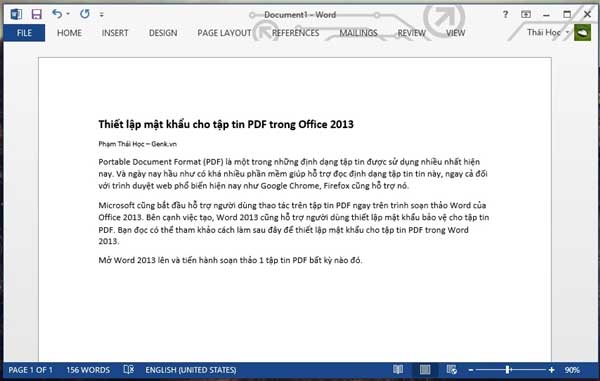
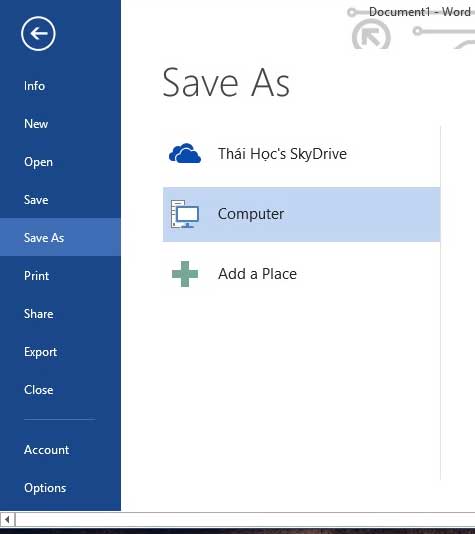
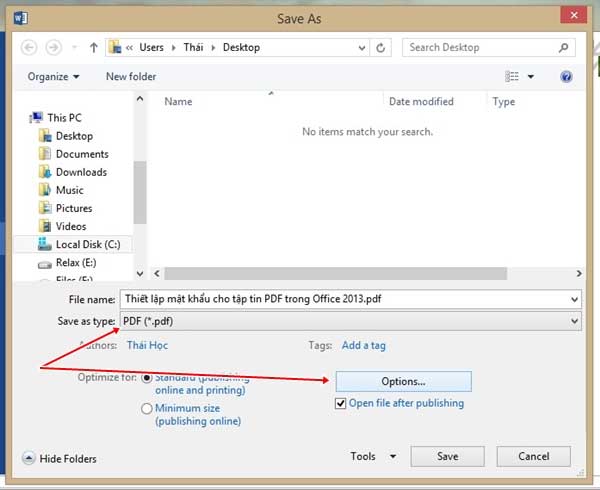
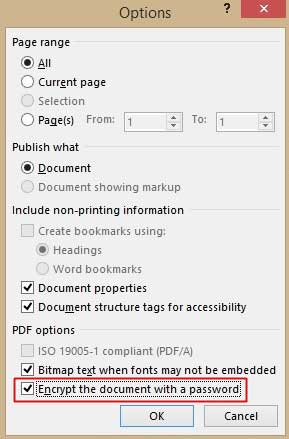
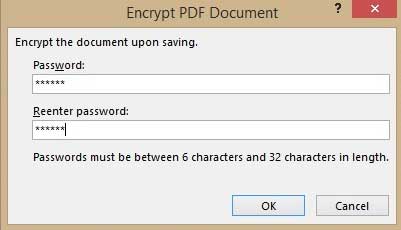
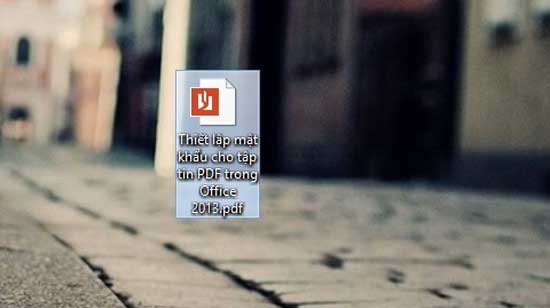
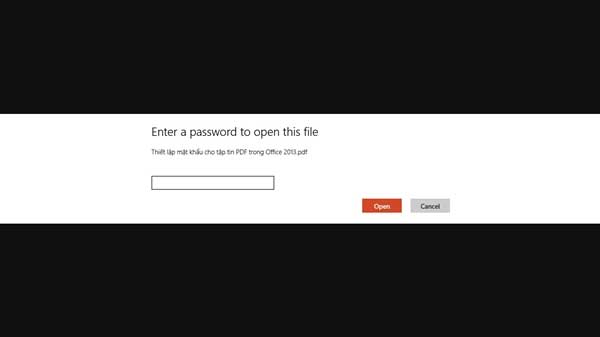
			<p style="text-align: justify;"><span style="color: #333333;" data-mce-mark="1"><strong>Portable Document Format (PDF) là một trong những định dạng tập tin được sử dụng nhiều nhất hiện nay. Và ngày nay hầu như có khá nhiều phần mềm giúp hỗ trợ đọc định dạng tập tin này, ngay cả đối với trình duyệt web phổ biến hiện nay như <a title="Google Chrome - Duyệt web nhanh hơn, dễ dàng hơn và bảo mật hơn" href="http://www.download.com.vn/windows/internet+email+tools/web+browser/google-chrome/download" target="_blank">Google Chrome</a>, <a title="Firefox - Trình duyệt web nhanh, linh hoạt, an toàn" href="http://www.download.com.vn/internet+email+tools/web+browser/14542_firefox.aspx" target="_blank">Firefox</a> cũng hỗ trợ nó.</strong></span></p><p style="text-align: justify;">Microsoft cũng bắt đầu hỗ trợ người dùng thao tác trên tập tin PDF ngay trên trình soạn thảo Word của <a title="Microsoft Office Professional Plus 2013" href="http://www.download.com.vn/microsoft-office-professional-plus-2013/download" target="_blank"><strong>Office 2013</strong></a>. Bên cạnh việc tạo, Word 2013 cũng hỗ trợ người dùng thiết lập mật khẩu bảo vệ cho tập tin PDF. Bạn đọc có thể tham khảo cách làm sau đây để thiết lập mật khẩu cho tập tin PDF trong Word 2013.</p><p style="text-align: justify;"><strong>Mở Word 2013</strong> lên và tiến hành soạn thảo 1 tập tin PDF bất kỳ nào đó.</p><p style="text-align: center;"><img title="Mở Word 2013 lên và tiến hành soạn thảo 1 tập tin PDF bất kỳ nào đó." src="http://www.quantrimang.com.vn/photos/image/092013/18/PDF-1.jpg" alt="Thiết lập mật khẩu cho tập tin PDF trong Office 2013" width="600" height="381"></p><p style="text-align: justify;">Sau khi soạn thảo xong, bạn nhấn<strong> FILE > Save as.</strong></p><p style="text-align: center;"><strong><img title="Sau khi soạn thảo xong, bạn nhấn FILE > Save as." src="http://www.quantrimang.com.vn/photos/image/092013/18/PDF-2.jpg" alt="Thiết lập mật khẩu cho tập tin PDF trong Office 2013" width="475" height="534"><br></strong></p><p style="text-align: justify;">Tiếp theo bạn hãy chọn vị trí mà mình muốn lưu lại tập tin. Hãy nhớ thiết lập định dạng lưu lại là <strong>"PDF"</strong> nhé. Sau đó bạn chọn nút <strong>"Options"</strong> cũng ở ngay hộp thoại lưu tập tin.</p><p style="text-align: center;"><strong><img title=&#039;Hãy nhớ thiết lập định dạng lưu lại là "PDF" nhé. Sau đó bạn chọn nút "Options" cũng ở ngay hộp thoại lưu tập tin.&#039; src="http://www.quantrimang.com.vn/photos/image/092013/18/PDF-3.jpg" alt="Thiết lập mật khẩu cho tập tin PDF trong Office 2013" width="600" height="490"></strong></p><p style="text-align: justify;">Hộp thoại <strong>"Options"</strong> sẽ xuất hiện, bạn hãy tìm đến và đánh dấu vào dòng <strong>"Encrypt the document with a password".</strong> Sau đó nhấn <strong>OK.</strong></p><p style="text-align: center;"><strong><strong><img title=&#039;Đánh dấu vào dòng "Encrypt the document with a password". Sau đó nhấn OK.&#039; src="http://www.quantrimang.com.vn/photos/image/092013/18/PDF-4.jpg" alt="Thiết lập mật khẩu cho tập tin PDF trong Office 2013" width="289" height="439"></strong><br></strong></p><p style="text-align: justify;">Hộp thoại thiết lập mật khẩu sẽ xuất hiện. Bạn hãy nhập mật khẩu cần thiết lập vào tập tin PDF và nhấn <strong>OK</strong> để lưu lại.</p><p style="text-align: center;"><strong><strong><img title="Bạn hãy nhập mật khẩu cần thiết lập vào tập tin PDF và nhấn OK để lưu lại." src="http://www.quantrimang.com.vn/photos/image/092013/18/PDF-5.jpg" alt="Thiết lập mật khẩu cho tập tin PDF trong Office 2013" width="401" height="230"></strong></strong></p><p style="text-align: justify;">Trở lại hộp thoại <strong>Save as</strong>, bạn hãy nhấn <strong>"Save"</strong> để lưu lại tập tin.</p><p style="text-align: justify;">Thế là xong, bây giờ thử mở tập tin lúc nãy nhé.</p><p style="text-align: center;"><strong><strong><img title="Thế là xong, bây giờ thử mở tập tin lúc nãy nhé." src="http://www.quantrimang.com.vn/photos/image/092013/18/PDF-7.jpg" alt="Thiết lập mật khẩu cho tập tin PDF trong Office 2013" width="550" height="308"></strong></strong></p><p style="text-align: justify;">Hộp thoại yêu cầu nhập mật khẩu sẽ xuất hiện. Khá đơn giản phải không? </p><p style="text-align: center;"><strong><strong><img title="Hộp thoại yêu cầu nhập mật khẩu sẽ xuất hiện." src="http://www.quantrimang.com.vn/photos/image/092013/18/PDF-6.jpg" alt="Thiết lập mật khẩu cho tập tin PDF trong Office 2013" width="600" height="337"></strong></strong></p><div style="width:336px; margin:1em auto">
</div>
		</div>
				<div id="author">
						<p>
				<strong>Tác giả:</strong>
				Theo Genk
			</p>
						<p>
				<strong>Nguồn tin:</strong>
				http://www.quantrimang.com.vn
			</p>
		</div>
	</div>
	<div id="footer" class="clearfix">
		<div id="url">
			<strong>URL của bản tin này: </strong><a href="https://mangvn.org/savefile/Thu-thuat-tin-hoc/Thiet-lap-mat-khau-cho-file-PDF-trong-Office-2013-5968.html" title="Thiết lập mật khẩu cho file PDF trong Office 2013">https://mangvn.org/savefile/Thu-thuat-tin-hoc/Thiet-lap-mat-khau-cho-file-PDF-trong-Office-2013-5968.html</a>

		</div>
		<div class="clear"></div>
		<div class="copyright">
			&copy; MangVN
		</div>
		<div id="contact">
			<a href="mailto:admin@vinades.vn">admin@vinades.vn</a>
		</div>
	</div>
</div>
        <div id="timeoutsess" class="chromeframe">
            Bạn đã không sử dụng Site, <a onclick="timeoutsesscancel();" href="https://mangvn.org/#">Bấm vào đây để duy trì trạng thái đăng nhập</a>. Thời gian chờ: <span id="secField"> 60 </span> giây
        </div>
        <div id="openidResult" class="nv-alert" style="display:none"></div>
        <div id="openidBt" data-result="" data-redirect=""></div>
<script src="https://mangvn.org/assets/js/jquery/jquery.min.js"></script>
<script>var nv_base_siteurl="/",nv_lang_data="vi",nv_lang_interface="vi",nv_name_variable="nv",nv_fc_variable="op",nv_lang_variable="language",nv_module_name="news",nv_func_name="savefile",nv_is_user=0, nv_my_ofs=-4,nv_my_abbr="EDT",nv_cookie_prefix="nv4c_b41EI",nv_check_pass_mstime=1738000,nv_area_admin=0,nv_safemode=0,theme_responsive=1,nv_recaptcha_ver=2,nv_recaptcha_sitekey="6LfaEikpAAAAAB7BnT8L5ijh2CCG0esJquuWj9ZJ",nv_recaptcha_type="image",XSSsanitize=1;</script>
<script src="https://mangvn.org/assets/js/language/vi.js"></script>
<script src="https://mangvn.org/assets/js/DOMPurify/purify3.js"></script>
<script src="https://mangvn.org/assets/js/global.js"></script>
<script src="https://mangvn.org/assets/js/site.js"></script>
<script src="https://mangvn.org/themes/default/js/news.js"></script>
<script src="https://mangvn.org/themes/default/js/main.js"></script>
<script src="https://mangvn.org/themes/default/js/custom.js"></script>
<script type="application/ld+json">
        {
            "@context": "https://schema.org",
            "@type": "Organization",
            "url": "https://mangvn.org",
            "logo": "https://mangvn.org/uploads/logo-mangvn.png"
        }
        </script>
<script src="https://mangvn.org/themes/default/js/bootstrap.min.js"></script>
</body>
</html>