<!DOCTYPE html>
    <html lang="vi" xmlns="http://www.w3.org/1999/xhtml" prefix="og: http://ogp.me/ns#">
    <head>
<title>Hướng dẫn tạo chữ ký điện tử trực tuyến ấn tượng</title>
<meta name="description" content="Hướng dẫn tạo chữ ký điện tử trực tuyến ấn tượng - Savefile - Tin Tức -...">
<meta name="author" content="MangVN">
<meta name="copyright" content="MangVN [admin@vinades.vn]">
<meta name="generator" content="NukeViet v4.5">
<meta name="viewport" content="width=device-width, initial-scale=1">
<meta http-equiv="Content-Type" content="text/html; charset=utf-8">
<meta property="og:title" content="Hướng dẫn tạo chữ ký điện tử trực tuyến ấn tượng">
<meta property="og:type" content="website">
<meta property="og:description" content="Savefile - Tin Tức - https&#x3A;&#x002F;&#x002F;mangvn.org&#x002F;savefile&#x002F;Website-nen-vao&#x002F;Huong-dan-tao-chu-ky-dien-tu-truc-tuyen-an-tuong-3637.html">
<meta property="og:site_name" content="MangVN">
<meta property="og:url" content="https://mangvn.org/savefile/Website-nen-vao/Huong-dan-tao-chu-ky-dien-tu-truc-tuyen-an-tuong-3637.html">
<link rel="shortcut icon" href="https://mangvn.org/favicon.ico">
<link rel="canonical" href="https://mangvn.org/savefile/Website-nen-vao/Huong-dan-tao-chu-ky-dien-tu-truc-tuyen-an-tuong-3637.html">
<link rel="alternate" href="https://mangvn.org/rss/" title="Tin Tức" type="application/rss+xml">
<link rel="alternate" href="https://mangvn.org/rss/Tin-nhanh-Cong-nghe/" title="Tin Tức - Tin nhanh Công nghệ" type="application/rss+xml">
<link rel="alternate" href="https://mangvn.org/rss/Virut-Hacker-Bao-mat/" title="Tin Tức - Virut, Hacker & Bảo mật" type="application/rss+xml">
<link rel="alternate" href="https://mangvn.org/rss/CNTT/" title="Tin Tức - CNTT" type="application/rss+xml">
<link rel="alternate" href="https://mangvn.org/rss/Vien-thong/" title="Tin Tức - Viễn thông" type="application/rss+xml">
<link rel="alternate" href="https://mangvn.org/rss/May-tinh/" title="Tin Tức - Máy tính" type="application/rss+xml">
<link rel="alternate" href="https://mangvn.org/rss/Dien-thoai/" title="Tin Tức - Điện thoại" type="application/rss+xml">
<link rel="alternate" href="https://mangvn.org/rss/May-anh/" title="Tin Tức - Máy ảnh" type="application/rss+xml">
<link rel="alternate" href="https://mangvn.org/rss/Thu-thuat-Phan-mem/" title="Tin Tức - Thủ thuật - Phần mềm" type="application/rss+xml">
<link rel="alternate" href="https://mangvn.org/rss/Phan-mem-Tin-hoc/" title="Tin Tức - Phần mềm Tin học" type="application/rss+xml">
<link rel="alternate" href="https://mangvn.org/rss/Thu-thuat-tin-hoc/" title="Tin Tức - Thủ thuật tin học" type="application/rss+xml">
<link rel="alternate" href="https://mangvn.org/rss/Thiet-ke-Web/" title="Tin Tức - Thiết kế Web" type="application/rss+xml">
<link rel="alternate" href="https://mangvn.org/rss/Kien-thuc-co-ban/" title="Tin Tức - Kiến thức cơ bản" type="application/rss+xml">
<link rel="alternate" href="https://mangvn.org/rss/PHP-HTML-JavaScript/" title="Tin Tức - PHP, HTML & JavaScript" type="application/rss+xml">
<link rel="alternate" href="https://mangvn.org/rss/Quang-cao-tang-thu-nhap/" title="Tin Tức - Quảng cáo tăng thu nhập" type="application/rss+xml">
<link rel="alternate" href="https://mangvn.org/rss/Tao-Web-bang-NukeViet/" title="Tin Tức - Tạo Web NukeViet" type="application/rss+xml">
<link rel="alternate" href="https://mangvn.org/rss/Ban-tin-an-ninh/" title="Tin Tức - Bản tin an ninh" type="application/rss+xml">
<link rel="alternate" href="https://mangvn.org/rss/Tin-tuc-NukeViet/" title="Tin Tức - Tin tức NukeViet" type="application/rss+xml">
<link rel="alternate" href="https://mangvn.org/rss/Nhan-vat-su-kien/" title="Tin Tức - Nhân vật & sự kiện" type="application/rss+xml">
<link rel="alternate" href="https://mangvn.org/rss/Huong-dan-su-dung/" title="Tin Tức - Hướng dẫn sử dụng" type="application/rss+xml">
<link rel="alternate" href="https://mangvn.org/rss/He-thong-NukeViet-20/" title="Tin Tức - Hệ thống NukeViet 2.0" type="application/rss+xml">
<link rel="alternate" href="https://mangvn.org/rss/He-thong-NukeViet-10/" title="Tin Tức - Hệ thống NukeViet 1.0" type="application/rss+xml">
<link rel="alternate" href="https://mangvn.org/rss/NukeViet-co-ban/" title="Tin Tức - NukeViet cơ bản" type="application/rss+xml">
<link rel="alternate" href="https://mangvn.org/rss/Web-Internet/" title="Tin Tức - Web & Internet" type="application/rss+xml">
<link rel="alternate" href="https://mangvn.org/rss/Thu-thuat-Internet/" title="Tin Tức - Thủ thuật Internet" type="application/rss+xml">
<link rel="alternate" href="https://mangvn.org/rss/Dich-vu-tien-ich/" title="Tin Tức - Dịch vụ & tiện ích" type="application/rss+xml">
<link rel="alternate" href="https://mangvn.org/rss/Website-nen-vao/" title="Tin Tức - Website nên vào" type="application/rss+xml">
<link rel="alternate" href="https://mangvn.org/rss/Thong-tin-khuyen-mai/" title="Tin Tức - Thông tin khuyến mại" type="application/rss+xml">
<link rel="alternate" href="https://mangvn.org/rss/thuong-mai-dien-tu/" title="Tin Tức - Thương mại điện tử" type="application/rss+xml">
<link rel="alternate" href="https://mangvn.org/rss/Hau-truong/" title="Tin Tức - Hậu trường" type="application/rss+xml">
<link rel="alternate" href="https://mangvn.org/rss/Blog-Admin/" title="Tin Tức - Blog Admin" type="application/rss+xml">
<link rel="alternate" href="https://mangvn.org/rss/Cong-tac-vien/" title="Tin Tức - Cộng tác viên" type="application/rss+xml">
<link rel="alternate" href="https://mangvn.org/rss/Chuyen-cong-nghe/" title="Tin Tức - Chuyện công nghệ" type="application/rss+xml">
<link rel="alternate" href="https://mangvn.org/rss/Chuyen-kinh-doanh/" title="Tin Tức - Chuyện kinh doanh" type="application/rss+xml">
<link rel="alternate" href="https://mangvn.org/rss/Cuoc-song-quanh-ta/" title="Tin Tức - Cuộc sống quanh ta" type="application/rss+xml">
<link rel="alternate" href="https://mangvn.org/rss/Cuoi-thu-gian/" title="Tin Tức - Cười thư giãn" type="application/rss+xml">
<link rel="alternate" href="https://mangvn.org/rss/Lang-nghe-va-suy-ngam/" title="Tin Tức - Lắng nghe và suy ngẫm" type="application/rss+xml">
<link rel="alternate" href="https://mangvn.org/rss/Kien-thuc-Song/" title="Tin Tức - Kiến thức Sống" type="application/rss+xml">
<link rel="preload" as="style" href="https://mangvn.org/assets/css/font-awesome.min.css" type="text/css">
<link rel="preload" as="style" href="https://mangvn.org/themes/default/css/bootstrap.min.css" type="text/css">
<link rel="preload" as="style" href="https://mangvn.org/themes/default/css/style.css" type="text/css">
<link rel="preload" as="style" href="https://mangvn.org/themes/default/css/style.responsive.css" type="text/css">
<link rel="preload" as="style" href="https://mangvn.org/themes/default/css/news.css" type="text/css">
<link rel="preload" as="style" href="https://mangvn.org/themes/default/css/custom.css" type="text/css">
<link rel="preload" as="script" href="https://mangvn.org/assets/js/jquery/jquery.min.js" type="text/javascript">
<link rel="preload" as="script" href="https://mangvn.org/assets/js/language/vi.js" type="text/javascript">
<link rel="preload" as="script" href="https://mangvn.org/assets/js/DOMPurify/purify3.js" type="text/javascript">
<link rel="preload" as="script" href="https://mangvn.org/assets/js/global.js" type="text/javascript">
<link rel="preload" as="script" href="https://mangvn.org/assets/js/site.js" type="text/javascript">
<link rel="preload" as="script" href="https://mangvn.org/themes/default/js/news.js" type="text/javascript">
<link rel="preload" as="script" href="https://mangvn.org/themes/default/js/main.js" type="text/javascript">
<link rel="preload" as="script" href="https://mangvn.org/themes/default/js/custom.js" type="text/javascript">
<link rel="preload" as="script" href="https://mangvn.org/themes/default/js/bootstrap.min.js" type="text/javascript">
<link rel="stylesheet" href="https://mangvn.org/assets/css/font-awesome.min.css">
<link rel="stylesheet" href="https://mangvn.org/themes/default/css/bootstrap.min.css">
<link rel="stylesheet" href="https://mangvn.org/themes/default/css/style.css">
<link rel="stylesheet" href="https://mangvn.org/themes/default/css/style.responsive.css">
<link rel="StyleSheet" href="https://mangvn.org/themes/default/css/news.css">
<link rel="stylesheet" href="https://mangvn.org/themes/default/css/custom.css">
<style type="text/css">
	body{background: #fff;}
</style>
    </head>
    <body>
<div id="print">
	<div id="hd_print">
		<h2 class="pull-left">MangVN</h2>
		<p class="pull-right"><a title="MangVN" href="https://mangvn.org/">https://mangvn.org</a></p>
	</div>
	<div class="clear"></div>
	<hr />
	<div id="content">
		<h1>Hướng dẫn tạo chữ ký điện tử trực tuyến ấn tượng</h1>
		<ul class="list-inline">
			<li>Thứ năm - 03/11/2011 13:34</li>
			<li class="hidden-print txtrequired"><em class="fa fa-print">&nbsp;</em><a title="In ra" href="javascript:;" onclick="window.print()">In ra</a></li>
			<li class="hidden-print txtrequired"><em class="fa fa-power-off">&nbsp;</em><a title="Đóng cửa sổ này" href="javascript:;" onclick="window.close()">Đóng cửa sổ này</a></li>
		</ul>
		<div class="clear"></div>
		<div id="hometext">
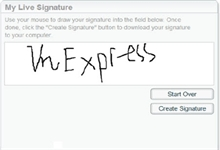
			Trang web hiện ra sau đó cung cấp 3 cách tạo nên chữ ký điện tử cá nhân, bao gồm: Using the signature creation wizard (tạo chữ ký bằng “thuật sĩ” của dịch vụ), Draw a signature straight to the screen (tự cầm bút ảo để vẽ chữ ký),
		</div>
				<div class="imghome">
			<img alt="Hướng dẫn tạo chữ ký điện tử trực tuyến ấn tượng" src="https://mangvn.org/uploads/news/2011_11/4.png" width="460" class="img-thumbnail" />
		</div>
		<div class="clear"></div>
		<div id="bodytext" class="clearfix">
			<div><span style="FONT-STYLE: italic">MyLiveSignature là dịch vụ trực tuyến miễn phí giúp người dùng tạo nên chữ ký điện tử mang phong cách riêng của mình.</span></div><div><span style="FONT-STYLE: italic"></span><span style="FONT-WEIGHT: bold"><br /><br />1. Truy cập trang <a href="http://www.mylivesignature.com">http://www.mylivesignature.com</a></span></div><div><span style="FONT-WEIGHT: bold"></span> </div><div><span style="FONT-WEIGHT: bold"></span> </div><div>Truy cập vào trang http://www.mylivesignature.com, rồi nhấn vào Click Here To Start hoặc truy cập trực tiếp tại http://www.mylivesignature.com/mls_cre-ate_signature.php để bắt đầu tiến hành tạo chữ ký.</div><div style="TEXT-ALIGN: center"><img src="http://Images.xhtt.vn/Images/Uploaded/Share/2011/11/20111103012927703/5.png" width="450" _fl="" /></div><div><span style="FONT-WEIGHT: bold"></span> </div><div><span style="FONT-WEIGHT: bold"></span> </div><div><span style="FONT-WEIGHT: bold">2. Chọn 1 trong 3 cách tạo chữ ký</span></div><div><span style="FONT-WEIGHT: bold"></span> </div><div><span style="FONT-WEIGHT: bold"></span> </div><div>Trang web hiện ra sau đó cung cấp 3 cách tạo nên chữ ký điện tử cá nhân, bao gồm: Using the signature creation wizard (tạo chữ ký bằng “thuật sĩ” của dịch vụ), Draw a signature straight to the screen (tự cầm bút ảo để vẽ chữ ký), Using a scanned image (tạo chữ ký từ ảnh chứa tên mình). Trong đó, với cách tạo chữ ký Using a scanned image thì người dùng cần trả phí để nhận được kết quả.</div><div style="TEXT-ALIGN: center"><img src="http://Images.xhtt.vn/Images/Uploaded/Share/2011/11/20111103012927703/6.png" width="450" _fl="" /></div><div><span style="FONT-WEIGHT: bold">3. Cách Draw a signature</span></div><div><span style="FONT-WEIGHT: bold"></span> </div><div><span style="FONT-WEIGHT: bold"></span> </div><div>Với cách Draw a signature straight to the screen, nhấn chuột trái, rồi tự vẽ các đường nét tạo nên chữ ký của mình. Sau đó, nhấn Cre-ate Signature để lưu lại. Lúc lưu thành phẩm, cửa sổ Save As… của trình duyệt sẽ hiện ra để chọn nơi lưu. Trong lúc đang vẽ, nếu muốn làm lại thì nhấn vào Start Over.</div><div> </div><div> </div><div><div style="TEXT-ALIGN: center"><img src="http://Images.xhtt.vn/Images/Uploaded/Share/2011/11/20111103012927703/7.png" width="450" _fl="" /></div><div><span style="FONT-WEIGHT: bold">4. Chọn Using the signature creation wizard</span></div><div>Dịch vụ này tỏ ra chuyên nghiệp nhất với cách tạo chữ ký từ cách nhập tên. Chọn Using the signature creation wizard, rồi nhập vào ô Name tên người dùng muốn tạo chữ ký. Do dịch vụ chỉ hỗ trợ các font trong bảng mã Unicode vì vậy tránh nhập tên có dấu nặng, tốt nhất là nhập tiếng Việt không dấu sẽ có kết quả chuẩn hơn. Nhấn Next Step.</div></div><div><div style="TEXT-ALIGN: center"><img src="http://Images.xhtt.vn/Images/Uploaded/Share/2011/11/20111103012927703/8.png" width="450" _fl="" /></div><div><span style="FONT-WEIGHT: bold">5. Các loại chữ ký</span></div><div>Lúc này, dịch vụ sẽ tự động tạo nên các kiểu chữ ký khác nhau với tên đã nhập. Lựa chọn kiểu chữ ký mình thích, rồi nhấn Next Step. Ở đây có tất cả 120 kiểu chữ ký, nhưng trên màn hình chỉ hiện thị mỗi 10 kiểu nên cần nhấn vào các nút số thứ tự ở trên để xem thêm.</div></div><div style="TEXT-ALIGN: center"><img src="http://Images.xhtt.vn/Images/Uploaded/Share/2011/11/20111103012927703/9.png" width="450" _fl="" /></div><div><span style="FONT-WEIGHT: bold"></span> </div><div><span style="FONT-WEIGHT: bold"></span> </div><div><span style="FONT-WEIGHT: bold"></span> </div><div><span style="FONT-WEIGHT: bold">6. Chọn kích thước chữ ký</span></div><div><span style="FONT-WEIGHT: bold"></span> </div><div><span style="FONT-WEIGHT: bold"></span> </div><div><span style="FONT-WEIGHT: bold"></span> </div><div>Sau đó, chọn kích thước cho các ký tự của chữ ký. Dịch vụ cung cấp 10 kích thước khác nhau. Chọn xong, nhấn Next Step.</div><div style="TEXT-ALIGN: center"><img src="http://Images.xhtt.vn/Images/Uploaded/Share/2011/11/20111103012927703/10.png" width="409" _fl="" /></div><div><span style="FONT-WEIGHT: bold">7. Chọn màu cho chữ ký</span></div><div><span style="FONT-WEIGHT: bold"></span> </div><div><span style="FONT-WEIGHT: bold"></span> </div><div>Tiếp theo, nhấn vào đường bôi màu đen trên cửa sổ để mở hộp chọn màu, chọn màu sắc cho chữ ký từ bảng màu này, rồi nhấn Next Step.</div><div style="TEXT-ALIGN: center"><img src="http://Images.xhtt.vn/Images/Uploaded/Share/2011/11/20111103012927703/11.png" width="450" _fl="" /></div><div><span style="FONT-WEIGHT: bold">8. Các kiểu chữ nghiêng</span></div><div><span style="FONT-WEIGHT: bold"></span> </div><div><span style="FONT-WEIGHT: bold"></span> </div><div><span style="FONT-WEIGHT: bold"></span> </div><div>Bước kế tiếp dịch vụ cung cấp các kiểu nghiêng khác nhau cho chữ ký. Nhấn vào vào kiểu nghiêng muốn dùng, nhấn Next Step.</div><div style="TEXT-ALIGN: center"><img src="http://Images.xhtt.vn/Images/Uploaded/Share/2011/11/20111103012927703/12.png" width="428" _fl="" /></div><div><span style="FONT-WEIGHT: bold">9. Tải về máy</span></div><div><span style="FONT-WEIGHT: bold"></span> </div><div><span style="FONT-WEIGHT: bold"></span> </div><div><span style="FONT-WEIGHT: bold"></span> </div><div>Lúc này, sẽ hiện thông báo &quot;Finished! The signature is ready&quot;, kèm chữ ký thành phẩm bên dưới. Để tải về máy, nhấn vào Want to download this signature?</div><div style="TEXT-ALIGN: center"><img src="http://Images.xhtt.vn/Images/Uploaded/Share/2011/11/20111103012927703/13.png" width="460" _fl="" /></div><div><span style="FONT-WEIGHT: bold">10. Lưu và tải lên mạng</span></div><div><span style="FONT-WEIGHT: bold"></span> </div><div><span style="FONT-WEIGHT: bold"></span> </div><div><span style="FONT-WEIGHT: bold"></span> </div><div>Trên cửa sổ hiện ra, nhấn chuột phải vào thành phẩm, chọn Save Image As để lưu về máy hoặc tải bằng đường dẫn tại dòng URL.</div><div><div style="TEXT-ALIGN: center"><img src="http://Images.xhtt.vn/Images/Uploaded/Share/2011/11/20111103012927703/14.png" width="450" _fl="" /></div>Sau khi đã có tập tin ảnh của chữ ký điện tử, tải lên mạng để lấy đường dẫn và chèn vào phần thiết lập chữ ký của hộp thư mình đang dùng.<br /><br /></div><div><span style="FONT-WEIGHT: bold"></span> </div><div><span style="FONT-WEIGHT: bold"></span> </div><div><span style="FONT-WEIGHT: bold"></span> </div><div><span style="FONT-WEIGHT: bold">Thanh Trọng </span>(Theo VnExpress)</div>
		</div>
				<div id="author">
						<p>
				<strong>Nguồn tin:</strong>
				http://xahoithongtin.com.vn
			</p>
		</div>
	</div>
	<div id="footer" class="clearfix">
		<div id="url">
			<strong>URL của bản tin này: </strong><a href="https://mangvn.org/savefile/Website-nen-vao/Huong-dan-tao-chu-ky-dien-tu-truc-tuyen-an-tuong-3637.html" title="Hướng dẫn tạo chữ ký điện tử trực tuyến ấn tượng">https://mangvn.org/savefile/Website-nen-vao/Huong-dan-tao-chu-ky-dien-tu-truc-tuyen-an-tuong-3637.html</a>

		</div>
		<div class="clear"></div>
		<div class="copyright">
			&copy; MangVN
		</div>
		<div id="contact">
			<a href="mailto:admin@vinades.vn">admin@vinades.vn</a>
		</div>
	</div>
</div>
        <div id="timeoutsess" class="chromeframe">
            Bạn đã không sử dụng Site, <a onclick="timeoutsesscancel();" href="https://mangvn.org/#">Bấm vào đây để duy trì trạng thái đăng nhập</a>. Thời gian chờ: <span id="secField"> 60 </span> giây
        </div>
        <div id="openidResult" class="nv-alert" style="display:none"></div>
        <div id="openidBt" data-result="" data-redirect=""></div>
<script src="https://mangvn.org/assets/js/jquery/jquery.min.js"></script>
<script>var nv_base_siteurl="/",nv_lang_data="vi",nv_lang_interface="vi",nv_name_variable="nv",nv_fc_variable="op",nv_lang_variable="language",nv_module_name="news",nv_func_name="savefile",nv_is_user=0, nv_my_ofs=-4,nv_my_abbr="EDT",nv_cookie_prefix="nv4c_b41EI",nv_check_pass_mstime=1738000,nv_area_admin=0,nv_safemode=0,theme_responsive=1,nv_recaptcha_ver=2,nv_recaptcha_sitekey="6LfaEikpAAAAAB7BnT8L5ijh2CCG0esJquuWj9ZJ",nv_recaptcha_type="image",XSSsanitize=1;</script>
<script src="https://mangvn.org/assets/js/language/vi.js"></script>
<script src="https://mangvn.org/assets/js/DOMPurify/purify3.js"></script>
<script src="https://mangvn.org/assets/js/global.js"></script>
<script src="https://mangvn.org/assets/js/site.js"></script>
<script src="https://mangvn.org/themes/default/js/news.js"></script>
<script src="https://mangvn.org/themes/default/js/main.js"></script>
<script src="https://mangvn.org/themes/default/js/custom.js"></script>
<script type="application/ld+json">
        {
            "@context": "https://schema.org",
            "@type": "Organization",
            "url": "https://mangvn.org",
            "logo": "https://mangvn.org/uploads/logo-mangvn.png"
        }
        </script>
<script src="https://mangvn.org/themes/default/js/bootstrap.min.js"></script>
</body>
</html>